КЕП for НЗИС in 2026: cloud or smart card? A guide for dentists
Which qualified e-signature (КЕП) you need for НЗИС and the NHIF (НЗОК) report: personal or company, cloud or card, setup, 2026 prices and renewal.
In short
- A qualified cloud КЕП and a КЕП on a card have the same legal force. The difference is where the signing key is kept and whether your software can use it. The official pages of НЗИС, Bulgaria's national health information system, don't mention a cloud КЕП for doctors, so ask your software vendor.
- A personal КЕП is enough. According to НЗИС, it doesn't matter whether the signature belongs to an individual or a legal entity, "as long as it has a personal identifier" of the person who signs.
- A personal КЕП for 3 years with a card and reader costs €18.60 to €46.01 under the StampIT, B-Trust and InfoNotary tariffs in force in October 2026. Note when yours expires: without a valid КЕП you can't sign the NHIF report.
- DentaFlow Bridge for Windows signs with a КЕП on a card or USB token on the dentist's computer: DentaFlow never sees the PIN, and the key never leaves the token. It's tested with B-Trust. The НЗИС documents go through it, and the ambulatory sheet gets its НРН. A cloud КЕП isn't supported. You sign the NHIF report outside DentaFlow: DentaFlow generates the XML file that you upload to the NHIF portal, one file per contracted dentist.
In this article
- What КЕП do НЗИС and the NHIF require from a dentist?
- Personal or company КЕП for НЗИС?
- Cloud (mobile) КЕП or КЕП on a smart card: which works for НЗИС?
- What does your computer need?
- How much does a КЕП cost in 2026?
- How do you get or renew a КЕП?
- How do you sign with a КЕП in DentaFlow?
- When isn’t DentaFlow for you?
- What should you do before the next report?
- Sources
- Frequently asked questions
Every document your practice submits to the National Health Information System (НЗИС) is signed with the qualified electronic signature (КЕП) of the person who sends it. The monthly report to the NHIF (НЗОК), Bulgaria’s National Health Insurance Fund, is signed with the КЕП of the dentist who did the work. If you’re choosing your first КЕП or yours expires soon, here you’ll find what НЗИС and the National Framework Contract (NRD, НРД) require, how to choose between a cloud КЕП and a card, what to install and the 2026 prices.
We make DentaFlow, software for dental practices, so at the end we describe which of this DentaFlow takes on and what stays with you. The sources and tariffs were checked on 4–5 October 2026.
What КЕП do НЗИС and the NHIF require from a dentist?
They require a qualified electronic signature as defined in the eIDAS Regulation and Bulgaria’s Electronic Document and Electronic Trust Services Act. It has the legal effect of a handwritten signature and always belongs to a person, not to a company (eIDAS, art. 3(9) and art. 25(2)). You need it for:
- the documents you submit to НЗИС (Health Act, art. 28g; Ordinance № Н-6, art. 14). Your software also uses your КЕП to log in to НЗИС;
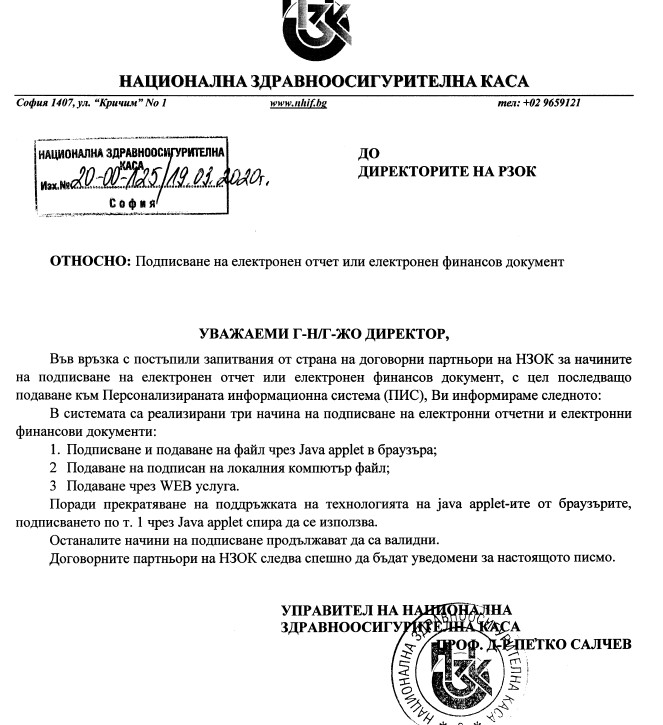
- the monthly NHIF report, which many dentists call the report to the regional fund (РЗОК). It’s signed by the dentists who did the work (NRD, art. 113), and the NHIF portal accepts a file signed on your computer (NHIF letter of 19 February 2020);
- the invoice to the NHIF, which the manager or an authorized person signs (art. 115(4));
- logging in to ПИС, the NHIF’s personalized information system.
You can submit dental documents to НЗИС once a month, together with the report, but НЗИС recommends doing it right after the activity. The report deadlines are in our overview of the 2026–2028 NRD.
Personal or company КЕП for НЗИС?
НЗИС’s FAQ for medical professionals says: “It doesn’t matter whether you choose a qualified electronic signature of a natural person or of a legal entity, as long as it has a personal identifier of the person who will use the signature.”
- A “company” КЕП also belongs to a person. Providers sell it as a professional certificate; B-Trust describes it as “for a natural person associated with the legal entity.” It contains both your personal identification number (ЕГН) and the company’s registration number (ЕИК).
- A company’s electronic seal is not a signature. Under eIDAS, a seal belongs to the legal entity (art. 3(24)), so, in our view, it doesn’t meet the НЗИС condition of a personal identifier.
For НЗИС and the NHIF report, a personal КЕП is enough: the NHIF’s technical documents describe both types. A professional certificate makes sense if you sign for the company in dealings with other institutions, but at B-Trust it costs almost four times as much (prices below).
Cloud (mobile) КЕП or КЕП on a smart card: which works for НЗИС?
In our view, the safer choice today is a КЕП on a smart card or USB token: it works with programs that sign on the computer. Get a cloud КЕП only if your software vendor confirms it has built in your provider’s cloud КЕП. Legally the two are equal when the cloud КЕП is qualified (eIDAS, art. 29a).
| КЕП on a smart card or USB token | Cloud (mobile) КЕП | |
|---|---|---|
| Where the key is | On the card or token; you sign with a PIN on the computer | With the provider; you confirm each signature in a phone app (B-Trust Mobile, SignZone, Evrotrust) |
| What you need | A reader, the provider’s driver, sometimes a helper program from your medical software | A phone with internet and medical software that supports your provider’s cloud КЕП |
| Risks | A forgotten or broken token; an old card model; two tokens on one computer | A limited number of signatures in the package; a dead phone battery or no internet during appointments |
Cloud packages are sold by number of signatures (prices below), and each НЗИС document is signed separately, including amendments and cancellations. InfoNotary’s tariff doesn’t say whether signing through medical software counts as “your own documents” in SignZone Active.
What does your computer need?
- A reader or USB token. These usually come in a kit with the КЕП.
- The provider’s software. B-Trust provides SafeNet or, for Windows only, Cryptovision, and supports Windows 10 and 11, macOS 13 to 26 and Linux (RHEL and Ubuntu). StampIT has a Windows installer with SafeNet Authentication Client, and InfoNotary has one for Windows 10 and 11 plus drivers for macOS 14 and later.
- Your medical software’s helper program. The browser can’t sign with the token on its own. This program may be Windows-only even if your КЕП works on a Mac: check before you buy a computer or software.
Common problems
- “Client certificate not present.” НЗИС’s help for patients gives three causes: the certificate isn’t installed in the browser, the browser wasn’t restarted after the device was plugged in, or the wrong certificate was selected. In our view, the same applies to the dentist’s token.
- An old card. B-Trust no longer issues or renews certificates on Gemalto IDPrime MD 940 and 840 cards: you’ll need a new card when you renew.
How much does a КЕП cost in 2026?
The prices are for a personal КЕП, include VAT unless noted otherwise, and come from the providers’ official tariffs. “Kit” means certificate, card and reader.
| Provider | КЕП on a card, kit | Certificate only (renewal or your own card) | Cloud КЕП | Prices as of |
|---|---|---|---|---|
| B-Trust (Borica) | €18.30 for 1 yr · €20.70 for 3 yrs online | €5.40 for 1 yr · €7.80 for 3 yrs online | Certificate included in the package; from 3 free operations a year to €60.00 a year with no limit | Tariff in force from 1 Aug 2026 |
| StampIT (Information Services) | Doc: €18.60 for 3 yrs · 1 yr only under the free-professions tariff: €18.60 | Doc: €6.00 for 3 yrs | Not found | Prices valid from 5 Jan 2026 |
| InfoNotary | €30.68 for 1 yr · €46.01 for 3 yrs | €12.27 for 1 yr · €27.61 for 3 yrs; renewal €9.20 for 1 yr | Certificate free; SignZone Active €6.14 a year with 10,000 signatures on your own documents | Tariff in force from 17 Aug 2026 |
| Evrotrust | Smart card (USB) €40.90 for 2 yrs; optional reader €18.41; VAT not stated | — | App and certificate free, with 3 free signatures; paid plans only in the app | Page dated 15 Dec 2025 |
A professional КЕП costs more: €38.70 for 1 year and €80.70 for 3 years at B-Trust (online kit, against €20.70 for a personal one), and €24.00 and €64.20 for StampIT DocPro (certificate only), under the same tariffs. We couldn’t check eDocs (Idox Bulgaria) prices as of 5 October 2026.
How do you get or renew a КЕП?
- Choose a provider from the list of the Communications Regulation Commission (КРС) that your software also works with. Bulgaria has five qualified providers: B-Trust (Borica), Evrotrust, InfoNotary, StampIT (Information Services) and eDocs (Idox Bulgaria).
- Verify your identity. B-Trust takes orders online, with remote identification and courier delivery, or at an office; StampIT at an office or through “mobile issuance”; InfoNotary at an office for a card КЕП and by video identification in SignZone for a cloud one.
- Install the provider’s software and sign a test document on the computer you’ll work from. B-Trust and InfoNotary have programs for signing documents.
- Set a renewal reminder. B-Trust sends emails 30, 15, 7 and 3 days before expiry. Renewal is cheaper than a new kit if your card is still supported.
How do you sign with a КЕП in DentaFlow?
In DentaFlow, the dentist signs with the КЕП they already have on a card or USB token, on their own computer. DentaFlow runs in the browser, and the signing is done by DentaFlow Bridge, a small program for Windows 10 and 11 that already signs with a token. The НЗИС documents go through it, and the ambulatory sheet gets its НРН.
- The PIN and the key stay with you. You enter the PIN in the Windows or driver window, and DentaFlow never sees it. The private key never leaves the card or token, and DentaFlow’s servers can’t sign with your КЕП.
- Tested with B-Trust. The program signs with a КЕП that Windows recognizes after you install the provider’s software. It’s been tested with a B-Trust (Borica) USB token; we expect the same with a StampIT or InfoNotary КЕП, but haven’t tested those yet. If you have one, tell us when you book the demo.
- Installation. The Admin downloads the program from the profile menu: КЕП Signing Bridge (КЕП мост за подписване). It installs without administrator rights and starts on its own when you sign in to Windows, but per user: it has to be in every Windows user profile a dentist signs from. Use Chrome or Edge, with one valid КЕП in the profile: if the program finds more than one, signing stops with an error.
- The NHIF report. DentaFlow builds the monthly report from the NHIF visits: a separate XML file for each dentist who reports under the contract, so each dentist will sign their own file with their own КЕП. DentaFlow generates the XML file that you upload to the NHIF portal: you sign it with your КЕП on your computer (for example with your provider’s signing program) and upload it yourself; DentaFlow doesn’t sign or submit it.
- Setting up the report. For a dentist to be included, their profile (Settings → Doctors & Staff) needs a UIN (УИН) and the “Reports under the clinic’s NHIF contract” tick, and with several dentists every NHIF visit needs a dentist. For every NHIF patient, fill in “RHIF of residence” and “Health region (of residence)” under “Health insurance”: the RHIF field is new and isn’t filled in automatically for existing patients.
A КЕП isn’t included in any DentaFlow subscription plan; you buy it directly from a provider. The steps are in the Help Center: KEP signing & DentaFlow Bridge.
When isn’t DentaFlow for you?
- If you want to sign with a cloud КЕП. DentaFlow supports neither Evrotrust’s mobile КЕП nor B-Trust’s cloud КЕП.
- If your practice has no Windows computer. The schedule, records and invoices work in the browser on a Mac, a tablet or a phone, but КЕП signing and the patient’s tablet signature need Windows.
What should you do before the next report?
- Check the КЕП of every dentist and of the manager: when it expires and whether the card is still supported.
- Ask your software vendor which providers and tokens its signing has been tested with, which system and browser it works on, and whether it supports a cloud КЕП. There are more demo questions in our article on dental software and НЗИС.
- Sign a test document with each dentist’s КЕП, on the computer they’ll sign from, before report day.
Sources
All sources were opened on 4–5 October 2026, unless stated otherwise.
- Regulation (EU) No 910/2014 (eIDAS), consolidated text, EUR-Lex (Bulgarian text): art. 3, 25 and 29a.
- Electronic Document and Electronic Trust Services Act (Закон за електронния документ и електронните удостоверителни услуги), lex.bg: art. 13 and 32.
- Health Act (Закон за здравето), lex.bg: art. 28g, and Ordinance № Н-6 of 21 December 2022 on НЗИС, lex.bg: art. 14, read 29 September 2026.
- НЗИС: questions and answers for medical professionals, for developers and for citizens.
- НЗИС: specifications: “Автентикация за достъп до API” (API access authentication) v1.0.2 (18 November 2020) and “Подписване на е-документи с pen tablet” (signing e-documents with a pen tablet) v1.0.2 (8 November 2023).
- НРД № РД-НС-01-00-5 of 16 September 2026 for dental care (State Gazette issue 88 of 25 September 2026): art. 113, 115 and 129, read 29 September and 4 October 2026, and art. 120, read 29 September 2026.
- NHIF: logging in to ПИС and the letter “Подписване на електронен отчет или електронен финансов документ” (signing an electronic report or electronic financial document) of 19 February 2020.
- КРС: electronic trust services and Bulgaria’s trusted list, issued 1 June 2026.
- B-Trust: prices, tariff (PDF), in force from 1 August 2026, cloud certificates, system requirements, signing software, questions and answers, required documents.
- StampIT: prices valid from 5 January 2026, software, questions and answers.
- InfoNotary: e-signature for individuals, tariff v2.3, in force from 17 August 2026, help and instructions.
- Evrotrust: prices and subscriptions, 15 December 2025.
Our descriptions of DentaFlow follow the Help Center articles: KEP signing & DentaFlow Bridge, NHIS documents: D001, D003, D007, Patient signature: pen tablets and Monthly NHIF claims & XML, plus data from the app and from DentaFlow Bridge as of 5 October 2026. Separate XML files per dentist and the “RHIF of residence” field: from the app as of 5 October 2026.
This article reflects what was published as of 4–5 October 2026. We’ll update it when НЗИС publishes rules for cloud КЕП and when the providers change their tariffs.
Questions
Frequently asked questions
How long is a КЕП issued for?
It depends on the provider and on what you choose. B-Trust and InfoNotary issue a КЕП for 1 or 3 years. StampIT Doc is for 3 years only; for 1 year, StampIT offers a certificate under its free-professions tariff. The Evrotrust smart card is for 2 years. The validity dates are in the certificate itself.
Does every dentist in the practice need their own КЕП?
For the NHIF report, yes: the NRD requires it to be signed by the dentists who did the work (art. 113(3)). In НЗИС, every message carries the signature of the person who sends it, so in practice every dentist who submits their own ambulatory sheets needs their own КЕП. One dentist's КЕП can't stand in for another dentist's signature. In DentaFlow, the monthly report holds a separate XML file for each contracted dentist, so each dentist will sign their own file.
Can the practice's manager (управител) or an administrator sign the NHIF report instead of the dentist?
Not the report. The NRD requires it to be signed with a КЕП by the dentists who did the work (art. 113(3)). The electronic financial reporting documents, such as the invoice to the NHIF, are signed with a КЕП by the manager or an authorized person (art. 115(4)).
Is the patient's signature on the tablet a КЕП?
No. The tablet is one of the ways the patient confirms the visit, alongside their own КЕП, a one-time code from НЗИС or a signature on paper (NRD, art. 129(7)). The НЗИС specification for tablet signing doesn't apply to devices with a КЕП. The dentist signs separately, with their own КЕП.
More from this section
-
 Switching dental software: a practical migration plan A patient list is not the entire record. A practical plan for exports, a trial import and moving to new software while keeping access to the old history.
-
 Dental software pricing in Bulgaria: a 2026 cost guide How to compare offers with the same scope and calculate your first- and second-year costs before you choose dental software.
-
 Free dental software: what do you actually get? How to assess free dental software in Bulgaria: DinoDent, current terms, backups, support and a practical checklist before moving your practice.
Dental Pulse · DentaFlow
The system that runs the clinic.
With a website patients trust.
Booking, treatments, invoices, the NHIF report and a patient portal. A clinic website from the same team, if you need one.