Monthly NHIF claims & XML
This guide shows how to generate the monthly NHIF claim in DentaFlow, download the ready XML files, and track the claim’s status through to acceptance in the NHIF portal. It’s written for Admin — only that role sees the claims page. The app screenshots show the Bulgarian interface; every label below gives the Bulgarian original in parentheses.
At a glance
- Claims are generated at /nhif/claims — pick a year and month, then Generate draft (Генерирай чернова). DentaFlow collects the activities and builds the XML files straight away — the claim moves to Generated (Генерирана).
- The claim holds a separate AMB_DENT file for each dentist ticked Reports under the clinic’s NHIF contract (Отчита по договора на клиниката с НЗОК) — with that dentist’s NHIF visits for the month.
- Only NHIF activities with an НРД code go into the claim. You pick the code for each NHIF line when you log the visit — see Logging treatments & visits.
- Amounts are in euro — the NHIF share and the patient copay under Art. 105 of the НРД (National Framework Contract), at the prices in force on the activity date.
- DentaFlow generates the XML files that you upload to the NHIF portal. Then you mark the claim submitted, accepted or rejected.
- If a patient is missing data the claim needs, the month shows {count} patients missing NHIF data ({брой} пациенти без НЗОК данни) and a list of exactly what’s missing — before you generate.
- The Send to NHIF (Изпрати към НЗОК) button is already on the claim and needs DentaFlow Bridge 1.2.0 or newer (the latest released is 1.4.0), but uploading to NHIF’s information system (ПИС) hasn’t been verified with a real KEP yet. The working route is uploading the files to the NHIF portal yourself.
- The Reporting time (НРД Art. 89) (Време за отчитане (чл. 89 НРД)) card shows how many hours you’re reporting for the month under the time norms, against the ceiling.
Before you generate a claim
- /nhif/claims is available when Show НЗОК as a payer (Показвай НЗОК като платец) is on under Settings → Clinic profile → NHIS & NHIF (Настройки → Профил на клиниката → НЗИС и НЗОК). If it’s off, the page shows “NHIF contract not active” (Не е активиран НЗОК договор) with an Open settings (Отвори настройки) button, and NHIF claims is hidden from the sidebar. The clinic data (regional health insurance fund, clinic registration number, contract number, BULSTAT) and the dentists’ УИН are only checked when the XML is built — fill them in first, see NHIF: contract setup.
- Who reports under the contract. Tick Reports under the clinic’s NHIF contract (Отчита по договора на клиниката с НЗОК) on the profile of every dentist who works under the contract (Settings → Doctors & Staff). Each ticked dentist gets a separate file in the claim. If nobody is ticked, or a dentist with NHIF visits that month isn’t ticked, the claim stays a Draft and a Who reports under the NHIF contract (Кой отчита по договора с НЗОК) card appears above the month detail — see If generating stops on a dentist.
- An НРД code on every NHIF line. Lines saved without an НРД code are left out of the claim. Open the visit and pick a code in the “Clinical details (Клинични детайли)” step before you generate. DentaFlow flags them up front: in the month list the month gets a {count} without an НРД code ({брой} без НРД код) marker, and the month detail shows a {count} НЗОК activities without an НРД code will be left out of the claim ({брой} НЗОК дейности без НРД код няма да влязат в справката) card with the list of visits and an Open patient (Към пациента) link.
- Patients’ NHIF data. Check for patients with missing data — see Patients missing NHIF data.
Generating the claim
- Open NHIF claims (НЗОК справки) from the sidebar (only visible as Admin). You can also get there from Settings → Data → Reports (Настройки → Данни → Отчети), card “Monthly NHIF claims (Месечни отчети към НЗОК)” → Open claims (Към исковете).
- Pick the year with the buttons at the top right — last year or this year. Months are listed newest first: this year up to the current month, last year all 12.
- A month with NHIF activity and no claim yet shows the number of activities ready and a Generate draft (Генерирай чернова) button.
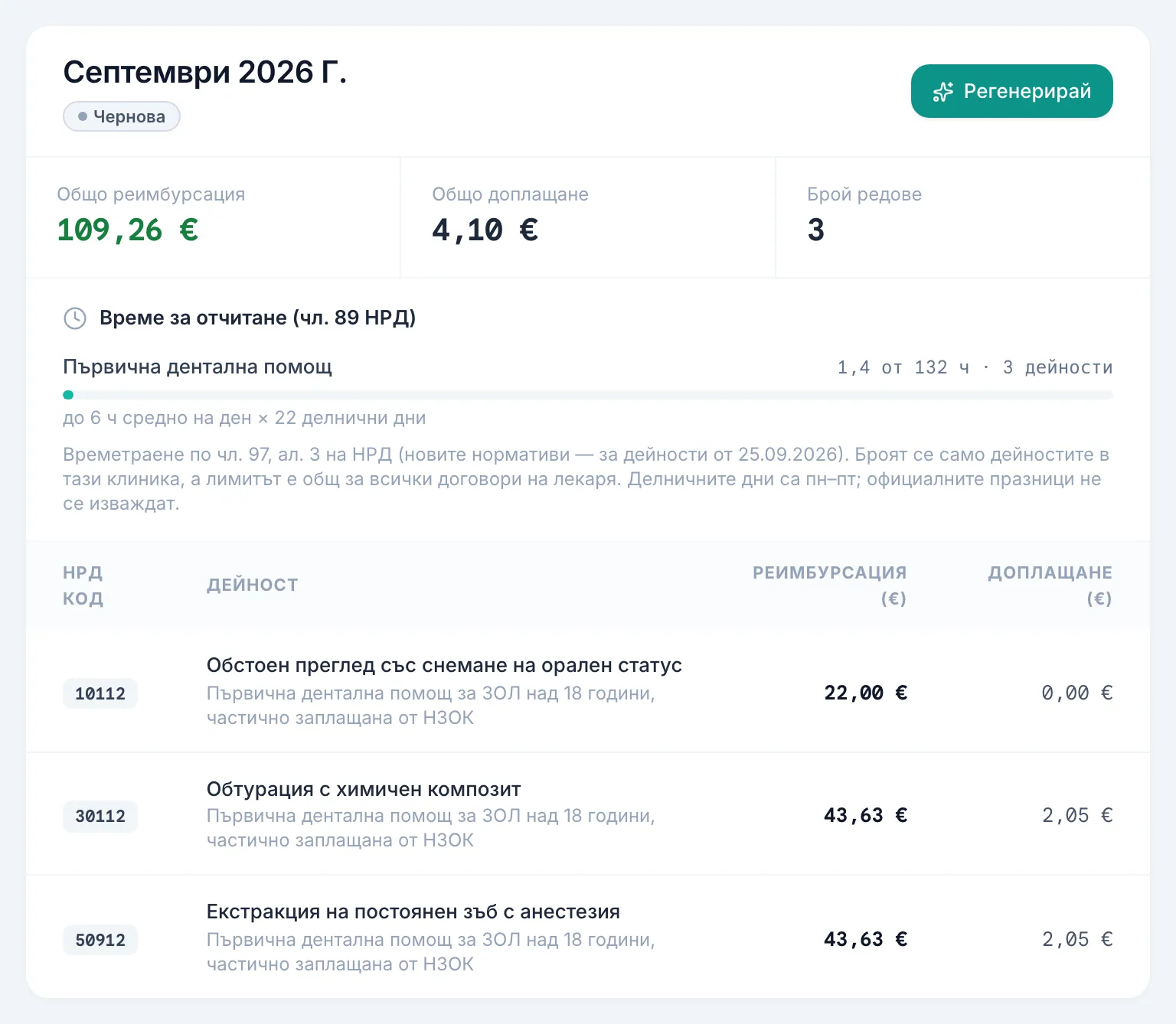
- Click it. DentaFlow collects the month’s activities that have an НРД code and builds one XML file per ticked dentist. On success the claim is Generated (Генерирана). At the top are Total reimbursement (Общо реимбурсация), Total patient copay (Общо доплащане) and Line count (Брой редове), and below them the Files for NHIF — one per doctor (Файлове за НЗОК — по един за всеки лекар) list: for each dentist you see “UIN {uin} · {sheets} ambulatory sheets · {services} activities”, the amount and a Download (Изтегли) button. Further down, each line shows the НРД code, the activity, the NHIF amount and the copay in euro.
- If the XML can’t be built (for example, contract or patient details are missing), the claim stays a Draft (Чернова) and you see a message saying what’s missing and for whom — for example “Maria Petrova: “Health booklet no.” is missing from the patient profile.” or “Maria Petrova, visit on 2026-09-14: “КСМП code” is missing.” Fix the data and click Regenerate (Регенерирай).
If generating stops on a dentist
When no dentist reports under the contract, or a dentist with NHIF visits that month isn’t ticked, the claim stays a Draft:
- A Who reports under the NHIF contract (Кой отчита по договора с НЗОК) card appears above the month detail with the reason — for example “{doctor} has NHIF visits this month but does not report under the contract. Include them below or change the visits’ financing.” — and a list of the dentists with their УИН.
- Click Include in the claim (Включи в справката) for every dentist who works under the clinic’s contract, and Exclude from the claim (Изключи от справката) for those who don’t. If a dentist doesn’t work under the contract but has visits financed by NHIF, change the financing on those visits.
- Click Generate again (Генерирай отново).
The change applies to later months too. You can also change it on the doctor’s profile — the Reports under the clinic’s NHIF contract tick (see NHIF: contract setup).
Patients missing NHIF data
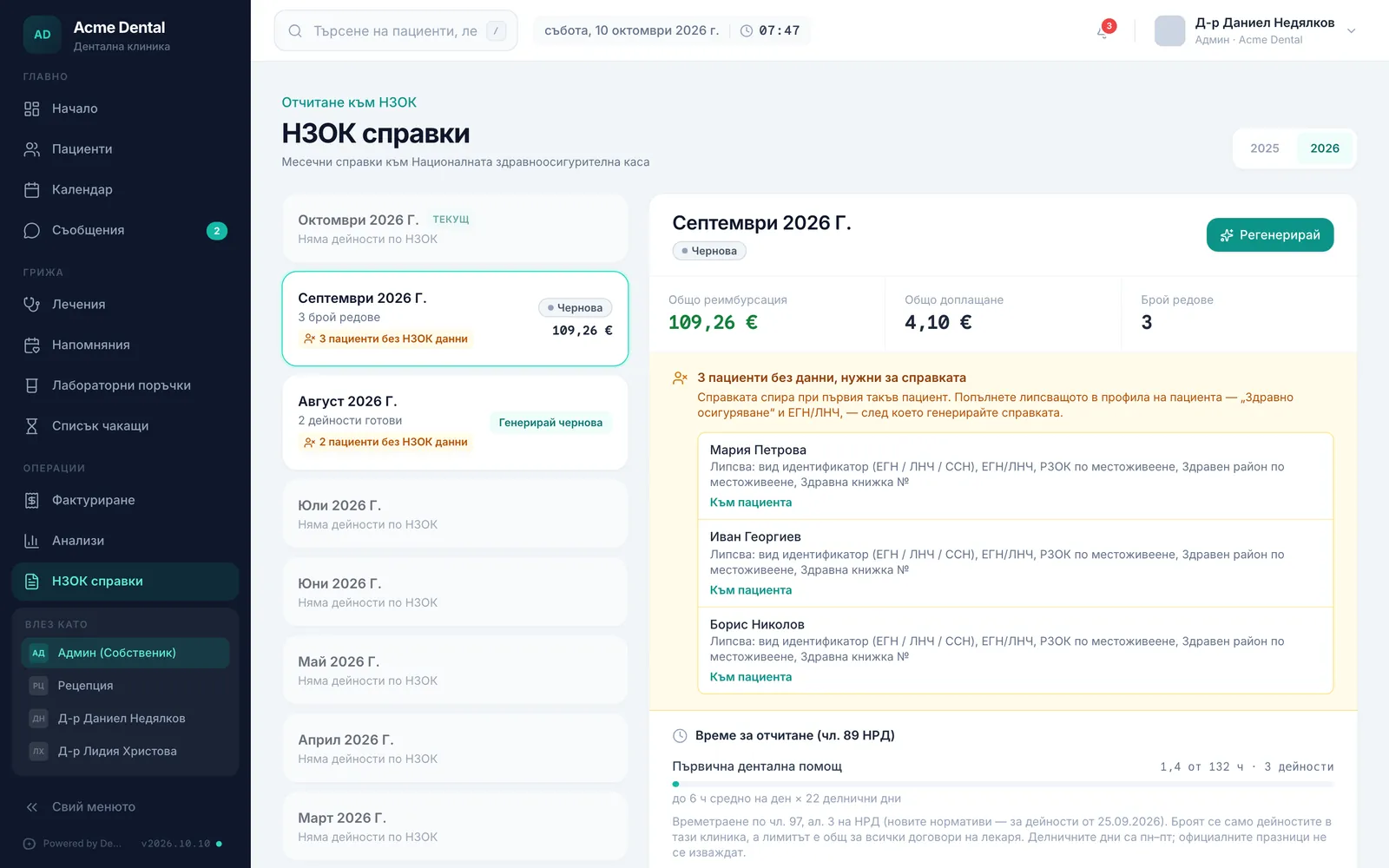
Generating stops at the first NHIF patient with incomplete data. So you don’t have to find them one at a time, DentaFlow lists them up front:
- In the month list, the month gets a {count} patients missing NHIF data ({брой} пациенти без НЗОК данни) marker.
- In the month detail, the {count} patients are missing data the claim needs ({брой} пациенти без данни, нужни за справката) card lists each patient with Missing: … (Липсва: …) — identifier type (EGN / LNCh / SSN), EGN/LNCh, regional health insurance fund (РЗОК) of residence, health region of residence or health booklet number.
- Click Open patient (Към пациента), fill in what’s missing on the profile (the “Health insurance (Здравно осигуряване)” section and the EGN/LNCh), then generate the claim.
The list shows while the month has no claim yet or the claim is a Draft. Foreign patients with a European Health Insurance Card (EHIC) aren’t supported in the claim yet.
Art. 105 prices
- Each activity is priced at the prices in force on its date: activities up to 31 Aug 2026 use the previous prices converted to euro; from 1 Sep 2026 the new Art. 105 prices of the НРД 2026–2028 apply, directly in euro.
- From 1 Sep 2026 the extra comprehensive exam for pregnant patients is a separate activity with 103xx codes (e.g. 10311, 10312). It counts neither against the yearly exam nor against the patient’s activity package.
- You see the same amounts — what NHIF pays and what the patient pays on top — as soon as you pick the НРД code in the visit.
Reporting time (НРД Art. 89)
The Reporting time (НРД Art. 89) card sits in the month’s detail view — under the stats of a generated claim, or above the lines of a month without a claim.
- DentaFlow adds up each activity’s duration using the time norms in Art. 97(3) of the НРД (the new norms apply to activities from 25 Sep 2026) — not the minutes typed into the visit.
- Time is split by package: Primary, Pediatric and Surgical dental care. Each row shows hours used against the ceiling — “up to {hours} h per day on average × {days} weekdays”.
- Ceilings: primary care — up to 6 h a day on average; pediatric — 6 h, rising to 8 h from 1 Oct 2026; surgical — no ceiling until 30 Sep 2026, then 8 h. Weekdays are Monday–Friday; public holidays aren’t subtracted.
- At 90% of the ceiling the row turns amber (“Close to the ceiling”); above it, red (“Over the ceiling by … h”). In the month list such a month gets a red “Over the time ceiling” marker.
- Only activities at this clinic are counted, while the ceiling covers all of the dentist’s contracts. Activities without a time norm (expert assessment, denture fabrication, anaesthesia) aren’t counted.
Downloading and submitting to the NHIF portal
- Open the month’s generated claim and review the lines and totals.
- Under Files for NHIF — one per doctor (Файлове за НЗОК — по един за всеки лекар), click Download (Изтегли) for each dentist. With several dentists the file name carries the УИН —
AMB_DENT_<year>_<month>_<УИН>.xml; with one dentist it’sAMB_DENT_<year>_<month>.xml. Claims generated before the per-doctor split have a single Download XML (Изтегли XML) button — download the file before you mark the claim submitted, because the button no longer shows after that. - Upload each file to the NHIF portal.
- Come back to DentaFlow and click Mark as submitted (Маркирай като подадена).
- Once NHIF returns a result, click Mark as accepted (Маркирай като приета) or Mark as rejected (Маркирай като отхвърлена) to close out the month.
If the claim shows a red Test file — do not upload to NHIF (Тестов файл — не го качвайте в НЗОК) warning, the files carry test НРН numbers from an NHIS test environment and aren’t for submission.
In the first days of every month, Admin sees a banner about the previous month’s claim (“Prepare … claim”, later “Overdue claim for …”) with an Open claims (Отвори справките) button. The banner disappears once the claim is marked submitted or accepted.
The “Send to NHIF” button
Each file of a generated or submitted claim has a Send to NHIF (Изпрати към НЗОК) button. It’s designed to upload the file to NHIF’s information system (ПИС) through DentaFlow Bridge with the dentist’s KEP, and Check status (Провери статус) to read back ПИС’s verdict. Once every file of the claim is in ПИС, the claim becomes Submitted (Подадена) automatically.
- The button needs DentaFlow Bridge 1.2.0 or newer (the latest released is 1.4.0), but sending to ПИС hasn’t been verified with a real KEP and an NHIF certificate yet. With an older version, sending stops with “The QES bridge is outdated — update DentaFlow Bridge to 1.2.0 or newer.” (КЕП мостът е стар — обновете DentaFlow Bridge до 1.2.0 или по-нов.) To update the bridge, see KEP signing & DentaFlow Bridge.
- When the clinic is set up for the simulation or the NHIS test environment, the button is disabled or sends only to the test ПИС. A file with test НРН numbers can’t be sent to the real ПИС.
- So for now, download the files and upload them to the NHIF portal yourself, as described above.
Regenerating
The Regenerate (Регенерирай) button only shows while the claim is a Draft (Чернова) — in practice, when building the XML stopped with an error. A generated, submitted, accepted or rejected claim can’t be regenerated — on an accepted or rejected claim you see “This claim is past draft and cannot be regenerated.”
Frequently asked questions
Does DentaFlow submit the claim to NHIF directly? Not yet. DentaFlow generates the XML files that you upload to the NHIF portal, and you set “Submitted”, “Accepted” and “Rejected” yourself. The Send to NHIF button is already on the claim, but uploading to ПИС hasn’t been verified with a real KEP yet, so the working route is uploading the files yourself.
Why is an activity missing from the claim? Most often because its visit line was saved without an НРД code. Open the visit, pick a code in the “Clinical details” step and generate the claim again while it’s still a Draft. If the claim is already Generated, email support@dentaflow.bg.
Can we report for several NHIF-contracted dentists? Yes. Tick “Reports under the clinic’s NHIF contract” for every dentist who works under the contract — the claim holds a separate file for each, with their own УИН and visits.
Why does generating stop on a patient? The patient is missing data the claim can’t be built without — identifier type, EGN/LNCh, regional health insurance fund of residence, health region or health booklet number. The “patients are missing data the claim needs” card lists all such patients at once (see Patients missing NHIF data).
Why can’t I see every month? You see last year and this year — last year because of January claims for December activity. Future months don’t appear, since there’s nothing to report yet.
Does DentaFlow handle the fourth adult activity in 2026? Yes. From 1 November to 31 December 2026 the package for insured adults over 18 includes a fourth activity — with the same codes as the first three. The package counter in the visit shows a limit of 4 for those dates. See Logging treatments & visits and The fourth dental activity from 1 Nov 2026.
Do our services need procedure codes if we have no NHIF contract? Yes. The procedure code (КСМП) is required clinical documentation on every service, NHIF contract or not — turning NHIF off doesn’t hide or disable the codes in the catalog.
Can I edit a claim after submitting it? Not directly — a generated, submitted, accepted or rejected claim can’t be regenerated from DentaFlow. If there’s a mistake, contact support@dentaflow.bg.