DentaFlow up close · Part 5 of 9
Tooth chart and treatment plans in DentaFlow: from dental status to accepted plan
How a dental status becomes a plan in DentaFlow: a chart by tooth surface and a phased, priced plan the patient accepts or asks to change in the portal.

In short
- The dental status becomes a plan without retyping. You mark the finding on the tooth, and "Propose treatment" adds the service from your price list to a new plan or the current one, with the tooth number and the price.
- Every tooth keeps its own record. The condition from the code list of НЗИС, Bulgaria's national health information system, plus surfaces, mobility, notes and images, and who changed the status and when.
- The patient says yes chairside or in the portal. Once you set a plan to "Presented to Patient", the patient sees it in their portal and can accept it or request changes. You record decisions made chairside yourself.
- You see how many plans are still waiting. "Analytics" → "Patients" counts discussed, accepted and rejected plans, plus lapsed ones with no decision for over 60 days: a sign there are patients to call.
- Honestly: there's no periodontal charting with pocket depths and no DICOM viewer, and your own plan templates aren't kept yet. The full list is at the end.
In this article
- What is a patient’s dental status, and when is it recorded?
- How do you chart the dental status in DentaFlow?
- Where are the history, the images and the status table?
- How does a finding become a treatment plan?
- What does a phased, priced treatment plan look like?
- How is the patient’s decision recorded?
- What happens to the plan at the next visit?
- How does the owner see accepted and lapsed plans?
- What doesn’t work yet?
- When isn’t DentaFlow for you?
- How can you try this with your own plans?
- Sources
- Frequently asked questions
You record the patient’s dental status anyway. The question is what happens to it after the exam. In DentaFlow, it becomes a tooth chart the dentist proposes treatment from. The plan is split into phases with prices, the patient’s decision (chairside or in the portal) is recorded, and the plan’s procedures carry into the next visits.
This is the fifth part of “DentaFlow up close”. For each step, we show how it usually goes and what DentaFlow does as of 10 October 2026.
What is a patient’s dental status, and when is it recorded?
The dental status (the contract calls it the “oral status”) is the picture of all the teeth: which are healthy, which have caries, a filling or a crown, and which are missing. Art. 88(1) of the 2026–2028 National Framework Contract for dental care (NRD, НРД) applies to dentists who provide the primary or children’s dental care package under contract with the NHIF (НЗОК), Bulgaria’s National Health Insurance Fund. At an insured patient’s first visit in the calendar year, these dentists must perform “a comprehensive exam with the oral status taken”. The status goes on the monthly “Ambulatory sheet” (form МЗ-НЗОК No. 2, the Ministry of Health and NHIF form). One of the quality criteria in art. 97 is “oral status: complete and correctly entered”. For what else the contract brings, see our overview of the 2026–2028 NRD.
How do you chart the dental status in DentaFlow?
Usually: a paper record or a form, letters in boxes and notes in the margin. A year later, nobody remembers which letter went in when.
With DentaFlow: the tooth chart is in every patient’s record, with FDI numbering. Click a tooth, and its panel opens on the right. Pick the condition and click “Apply”. Surfaces and mobility are saved as soon as you click them.
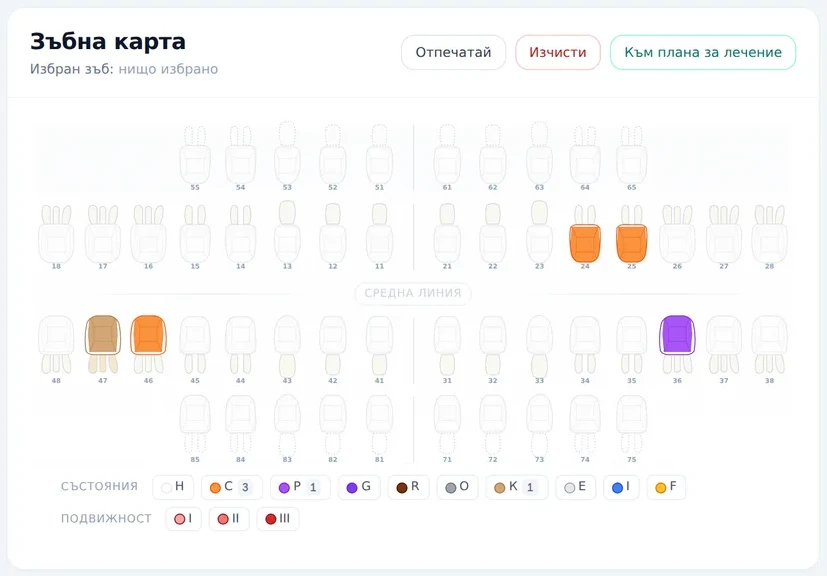
The chart in the record (Bulgarian interface). The legend below it shows how many teeth have each condition.
You choose from 20 conditions in the CL107 code list of НЗИС, Bulgaria’s national health information system: from caries, pulpitis and apical periodontitis to crown, bridge abutment, implant and calculus. For caries, a filling, a fracture and calculus, you also mark the individual surfaces: mesial, occlusal (incisal on front teeth), distal, buccal and lingual. Mobility (grade I, II or III) is marked separately, so one tooth can have both caries and mobility. Every tooth also has a field for clinical notes.
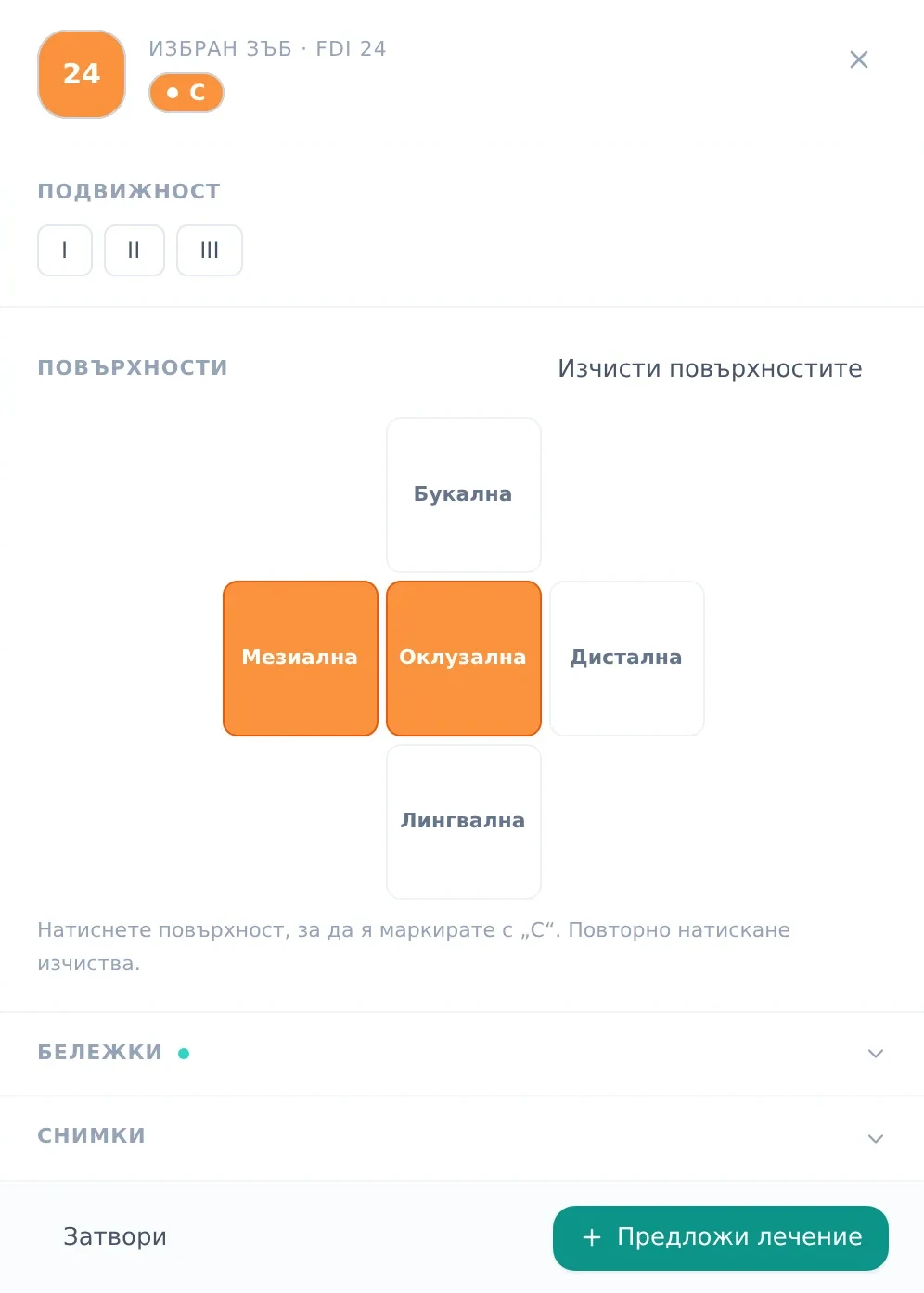
The panel for the selected tooth, with sample data: caries (C) on the mesial and occlusal surfaces.
Where are the history, the images and the status table?
Usually: the X-rays are in a folder on another computer, and the tooth’s history is scattered across several paper records.
With DentaFlow: everything about the tooth is in its panel and in the record:
- History. Every change to the tooth is logged in “History” with who made it and when.
- Images. An X-ray or photo tagged with a tooth number appears under “Images” for that tooth. There you can zoom in, rotate it and download it.
- The legend as a filter. Click a condition in the legend below the chart, and the other teeth fade. That way you quickly see, for example, every tooth with the “Caries” condition. The legend counts the condition applied to the whole tooth with “Apply”, not the marked surfaces.
- A table for printing. “Print” opens a “Dental status” sheet: the chart and a table with the condition, surfaces, mobility and notes for every tooth with a finding.
- Portal. The patient sees their tooth chart in the patient portal, read-only.
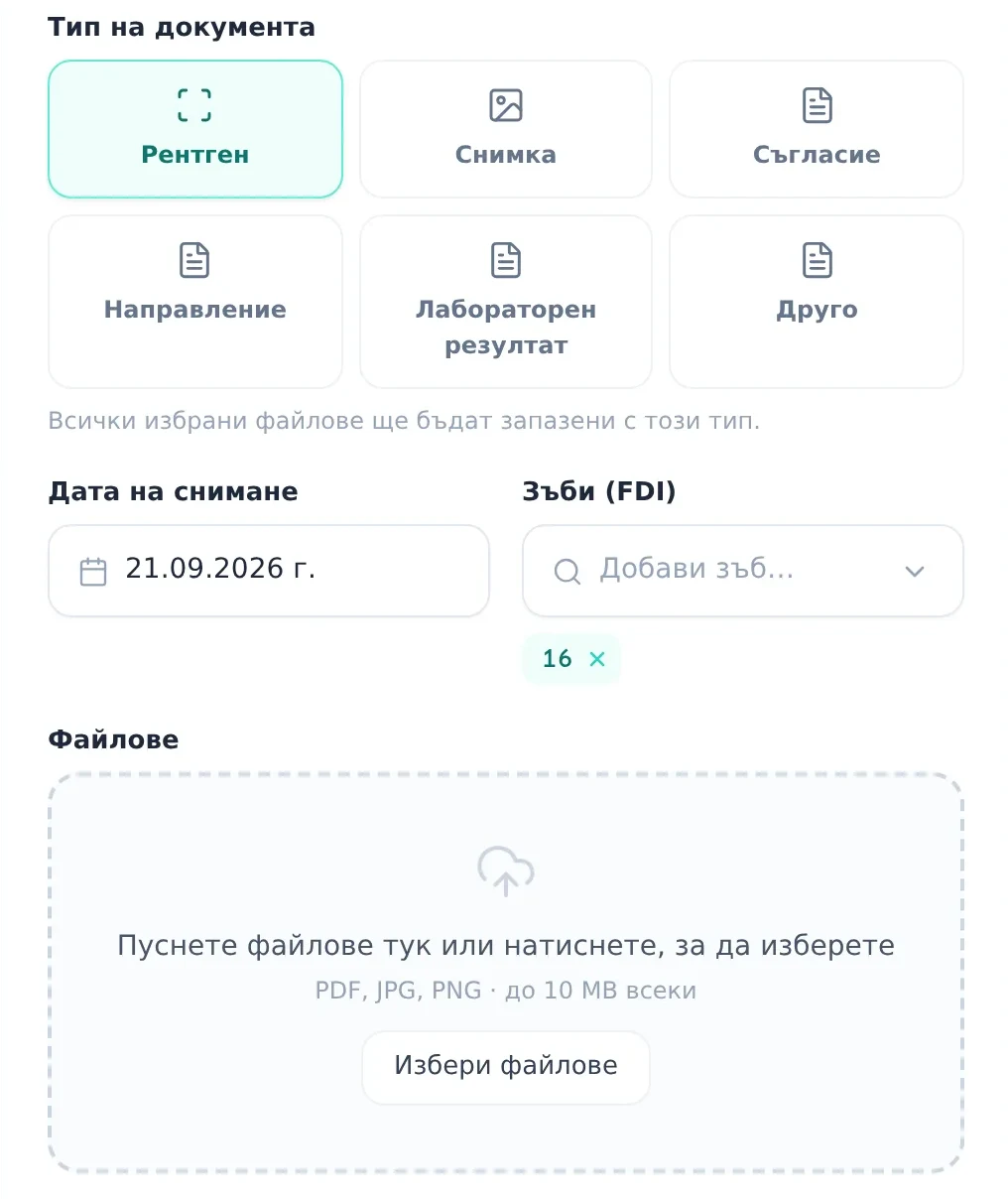
An image tagged with tooth 16 shows in the panel for tooth 16. PDF, JPG and PNG files up to 10 MB are accepted.
How does a finding become a treatment plan?
Usually: the dentist says the price out loud, the front desk writes it on a slip of paper, and with the next finding it all starts over.
With DentaFlow: in the tooth panel, “Propose treatment” shows the matching services from your catalog for the condition applied to the tooth: restorative services for caries, for example, and surgical and prosthetic ones for a missing tooth. You can also search the whole catalog. The service you pick goes into the plan with the tooth number and the price from your price list. The national procedure code (КСМП) is set on the service, so it follows the procedure the dentist picked, not the finding. All the codes under Ordinance No. 42 are in our КСМП code catalog.
You add the service to the current plan (“Draft” or “In Progress”) or start a new one. A service added to an existing plan is saved once you open the plan and click “Save Plan”.
What does a phased, priced treatment plan look like?
Usually: the plan is in the dentist’s head, the quote is in Word, and everyone remembers the discount differently.
With DentaFlow: the treatment plan has several parts:
- Clinical assessment: chief complaint, clinical findings and diagnosis.
- Phases: name, duration, number of visits and notes.
- Procedures in each phase: service, tooth, notes and a price you can change for that patient.
- A summary on the side: subtotal, a discount for the whole plan, final total, number of visits and the cost breakdown by phase.
- Templates: start from a sample template such as “Имплант + Коронка” (implant and crown) or “Спешно лечение” (emergency treatment), and swap its procedures for services from your catalog, so your own prices replace the sample ones. Template names show in Bulgarian, even in the English interface.
- Status: Draft, Presented to Patient, Accepted, In Progress, Completed or Rejected. You set it, and when the patient decides in the portal, the plan becomes “Accepted” or “Changes requested” on its own.
- Printing: “Print” opens the plan for printing or as a PDF, with the phases, prices and discount, plus space for the patient’s and dentist’s signatures.
If you only use a booking system today, this part is missing: per our comparison as of May 2026, Reservation.Studio, built for more than 10 kinds of business, has neither a tooth chart nor treatment plans (comparison).
How is the patient’s decision recorded?
Usually: the dentist explains chairside, the patient nods, and at home they remember neither the phases nor the total. Nobody knows which plans are still waiting for an answer.
With DentaFlow: you present the plan chairside (on screen or on a printout) and set the status to “Presented to Patient”. If the patient has an email address and hasn’t opted out of email, DentaFlow sends them the Bulgarian email “Вашият план за лечение е готов” (your treatment plan is ready) with a “Виж плана” (view the plan) button. A patient with portal access sees the phases, the procedures with prices, the discount and the total there, and clicks “Accept plan” or “Request changes” with a note. If they decide chairside, you mark it “Accepted” or “Rejected” yourself. The decision stays in the plan.
Once treatment starts, the patient also sees in the portal which procedures and phases are done and how much has been performed. Drafts, completed and rejected plans don’t show there, and neither do the dentist’s notes.
When the patient decides in the portal, you see:
- A notification in the bell at the top: “Пациент прие план за лечение” (a patient accepted a treatment plan) or “Пациент поиска промени в план за лечение” (a patient asked for changes to a treatment plan), with the patient’s name and, for a change request, the start of their note.
- A banner in the plan: “The patient accepted the plan in the portal on …” with the date, or “The patient asked for changes” with their notes and dates.
- “Plan reviews” on the dashboard: presented plans and plans with requested changes, with the plans that have change requests first.
Once you’ve revised the plan, you set the status back to “Presented to Patient”. If the patient has an email address and hasn’t opted out of email, they get the email again, and they can decide in the portal again. The plan saves in one go, with a check for a newer version, so an old open tab can’t overwrite the decision the patient made in the portal.
What happens to the plan at the next visit?
Usually: at the next appointment, the dentist searches the paper record for what was planned, and the front desk copies the procedures onto the bill by hand.
With DentaFlow: when the plan is “Accepted” or “In Progress”, the “Log visit” window shows “Active treatment plan” with the procedures from the current phase. With ”+ Add as line” or ”+ Add all”, you move them into the visit, with the price and the tooth. After you save the visit, they’re marked as done, and the phase is marked complete once all its procedures are done. You change the status of the whole plan yourself.
Invoices, deposits and lab work run separately from the plan, while instalments follow the accepted plan:
- The invoice is issued from the treatments performed in the record.
- A deposit for major treatment goes out from the front desk as a payment link for a specific appointment, in euros, US dollars or British pounds, and the money goes straight into the clinic’s own Stripe account (deposits).
- Instalments are set up from a plan that is “Accepted” or “In Progress”: “Split into instalments”, the number of instalments, the interval and the first due date, with an optional down payment. The whole plan’s final total is split, not individual phases.
- A lab order is offered by DentaFlow when you log a crown, bridge, veneer, inlay, onlay or denture from the patient’s record. “Send to lab” emails it to the lab, if the lab has an email address, and you then track it through to “Ready” and “Delivered”.
How does the owner see accepted and lapsed plans?
Usually: nobody counts how many plans were proposed and how many were started. The patient who said “I’ll think about it” just doesn’t come back.
With DentaFlow: in “Analytics” → “Patients”, the “Treatment-plan acceptance” card shows:
- “Discussed”: presented plans waiting for a decision, plus those where the patient asked for changes;
- “Accepted” and “Rejected”;
- “Lapsed”: presented plans that haven’t been updated for more than 60 days;
- what share of the decided plans was accepted.
The card counts plan statuses: the decisions patients make in the portal and the ones you record after a chairside conversation, so it’s only as accurate as your habit of recording the chairside ones. When “Lapsed” grows, you know there are patients to call. For everything else “Analytics” shows, see the Analytics feature page.
What doesn’t work yet?
We’re saying it here so nothing surprises you in the demo.
Not finished yet
- The “Виж плана” (view the plan) button in the email opens the plan directly only if the patient is already signed in to the portal. If not, after signing in they have to open “Treatment Plan” themselves, which shows the plan waiting for their decision. The portal’s bell links straight to it.
- Your own templates. “Save as Template” doesn’t keep the template permanently yet. For now, you start from the sample templates.
- Primary teeth disappear from the chart after a page reload, although what was marked is saved. For now, don’t rely on the chart for a child’s status.
Not in DentaFlow
- Periodontal charting with pocket depths: there’s only the “Пародонтит / Периимплантит” (periodontitis / peri-implantitis) condition and the mobility grade.
- A DICOM viewer: you upload X-rays as JPG, PNG or PDF.
- A/B/C options in one plan: make a separate plan for each option.
- An electronic signature on the plan.
- Payment per phase: a deposit for a single phase or an invoice straight from the plan. Instalments cover the whole plan.
- An automatic lab order when the patient accepts the plan.
- Chart updates from visits: the dentist marks the tooth’s status.
When isn’t DentaFlow for you?
- If you keep a periodontal chart with pocket depths and want it in the same software.
- If you view DICOM studies directly in the patient record.
- If the patient has to sign the plan electronically or choose between options A, B and C online.
- If you want a deposit or an invoice for each phase straight from the plan.
How can you try this with your own plans?
If your status is on a form today and the plan lives in Word or in the dentist’s head, the quickest way to see the difference is on one of your own cases:
- Book a 15-minute live walkthrough. We go through the chart, the plan and the visit on sample data.
- Walk us through one of your plans the way you present it today (on paper, in Word or verbally), and tell us your most common cases, for example an implant with a crown. We’ll lay them out together as phases with prices and compare the steps.
- If you’re switching from other software, prepare an export of your patients and services in CSV or Excel. We import them with a check for duplicate national ID numbers (ЕГН), and the dental statuses and plans are entered again in DentaFlow.
Sources
Prices follow the pricing page, read on 3 November 2026. The DentaFlow descriptions follow the app itself, checked on 10 October 2026. For more on the tooth chart, plans, the portal, documents, lab orders, analytics, import and deposits, see the Help Center:
- the tooth chart, treatment plans, the plan in the portal;
- documents and imaging, lab orders, analytics;
- patient import, deposit links.
The regulations:
- NRD No. РД-НС-01-00-5 of 16 September 2026 for dental care (State Gazette issue 88 of 25 September 2026), PDF on the NHIF website: arts. 88 and 97, read on 5 October 2026.
- Annex No. 2 “Първични медицински документи” (primary medical documents) to the 2026–2028 NRD, PDF on the NHIF website: the “Ambulatory sheet” form and the oral status legend, read on 5 October 2026.
Competitor facts come from our comparison pages and are public as of 18 May 2026.
This article reflects DentaFlow as of 10 October 2026.
Questions
Frequently asked questions
Do dental statuses and plans carry over from our current software?
No. Patients and the service catalog are imported from CSV or Excel, with a check for duplicate national ID numbers (ЕГН), and we help with the import for a one-off 99 EUR. The dentist charts the dental status again at the first exam in DentaFlow, and you upload X-rays to the patient's documents with a tooth number.
Does the tooth chart update itself when we log a treatment?
No. Each procedure in the visit records the teeth you mark on it, but the dentist updates the chart's status from the tooth panel.
Does the dental status reach НЗИС and the NHIF report?
The ambulatory sheet is built for НЗИС, the national health information system. It carries the teeth and conditions recorded on the visit's procedures, not the whole chart. For the NHIF (НЗОК), DentaFlow generates the XML file that you upload to the NHIF portal — one file for each dentist under the contract. The dental status in it comes from the chart as it stands on the day you build the file.
How much does it cost?
The tooth chart and treatment plans are in the base subscription: 39 EUR a month incl. VAT with one dentist, and each additional dentist is +15 EUR. All prices are on the pricing page.
In DentaFlow
Features from this article
- Tooth chart An FDI chart by surface, with history and images for every tooth From the selected tooth, the dentist adds a service from your catalog, with the tooth number and price, to a new plan or the current one. See how it works
- Treatment plans Phased, priced plans the patient accepts in the portal Sample templates for common cases. "Accept plan" or "Request changes" in the portal updates the plan's status, and the clinic is notified. See how it works
- Patient portal Appointments, plan, invoices, documents and chat in one place In 5 languages, on the patient's phone. See how it works
Part 5 of 9
DentaFlow up close
Next part: The patient portal Coming
- 01 A day in the clinic with DentaFlow
- 02 Website and software from one team
- 03 Online booking without the phone
- 04 The NHIF report: from treatment record to XML Coming
- 05 Tooth chart and treatment plans You are here
- 06 The patient portal Coming
- 07 Reminders and one conversation per patient Coming
- 08 Deposits and invoices Coming
- 09 The numbers the owner sees Coming
More from this section
-
 Switching dental software: a practical migration plan A patient list is not the entire record. A practical plan for exports, a trial import and moving to new software while keeping access to the old history.
-
 Dental software pricing in Bulgaria: a 2026 cost guide How to compare offers with the same scope and calculate your first- and second-year costs before you choose dental software.
-
 КЕП for НЗИС in 2026: cloud or smart card? A guide for dentists What НЗИС and the dental framework contract (NRD) say, what we know about a cloud КЕП, what your computer needs and what a КЕП costs.
Dental Pulse · DentaFlow
The system that runs the clinic.
With a website patients trust.
Booking, treatments, invoices, the NHIF report and a patient portal. A clinic website from the same team, if you need one.