Deposit links
This guide shows how to connect Stripe for the clinic, send a deposit link from an appointment, and decide what amount to ask for based on the type of visit. It applies to the Admin, Front Desk and Doctor roles; connecting or disconnecting Stripe is Admin only. The app screenshots show the Bulgarian interface; every label below gives the Bulgarian original in parentheses.
At a glance
- Deposits are processed through the clinic’s own Stripe account, never through a shared DentaFlow account.
- By email, DentaFlow sends the link. For Viber, DentaFlow opens Viber with a ready message that you send. SMS isn’t available yet — “coming soon.”
- There’s no QR code for the deposit — only chat-app links and email.
- Links expire 48 hours with no payment; the appointment’s status shows sent/paid/expired/forfeited. A patient with an email on file also gets an automatic reminder when about 12 hours remain.
- If the patient pays the deposit in cash at the desk, click Paid in cash at reception (Платено в брой на рецепцията) on the appointment: the online link is stopped and the deposit is marked paid.
- Only EUR, USD and GBP are accepted, even if the clinic’s settlement currency is something else.
Connecting Stripe (one-time, Admin only)
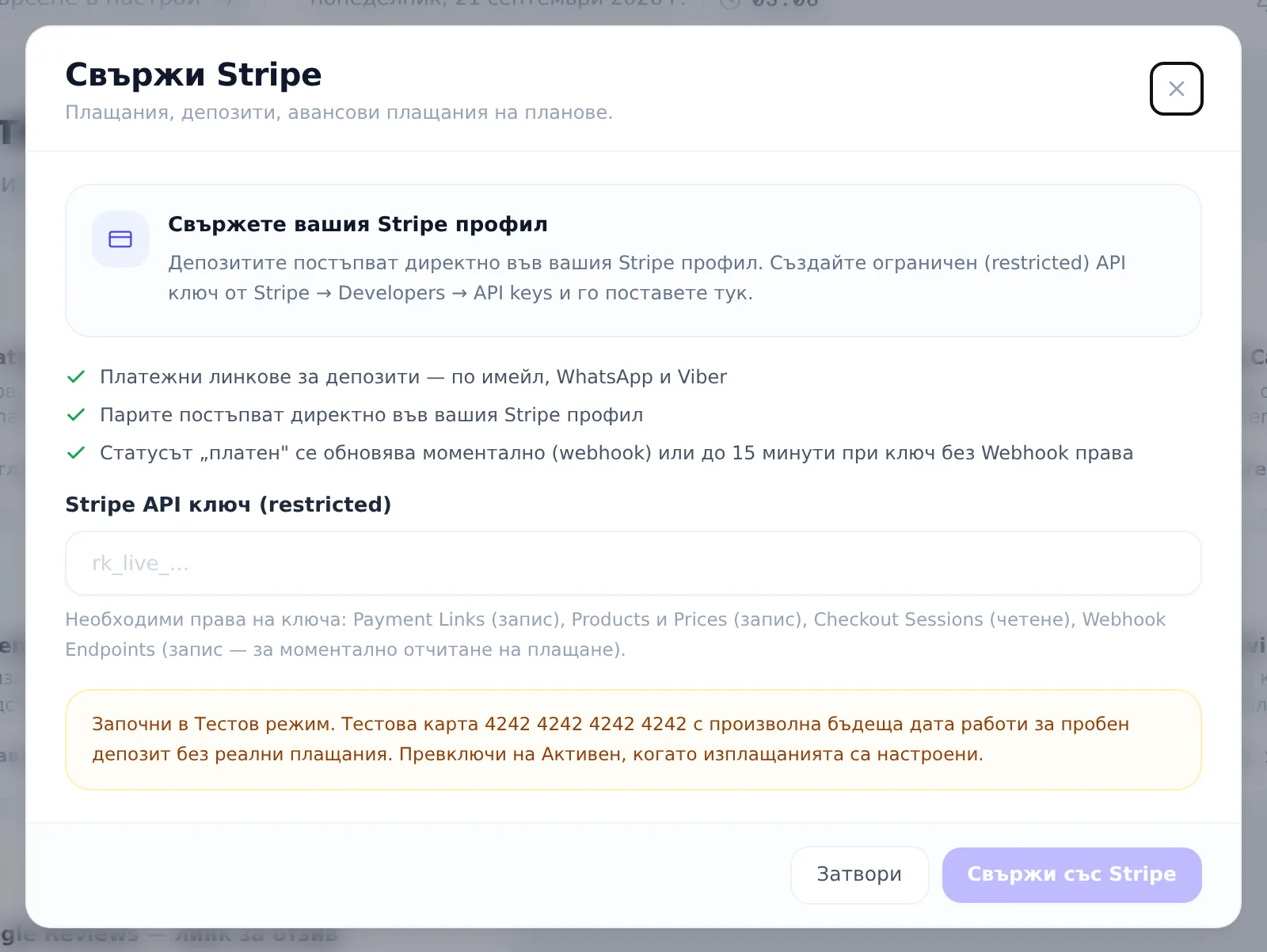
- Open Settings → Integrations (Настройки → Интеграции) and find the Stripe card.
- Paste a restricted API key (
rk_live_…orrk_test_…) into Stripe API key (restricted) (Stripe API ключ (restricted)). The key needs Payment Links (write), Products/Prices (write) and Checkout Sessions (read) scopes; Webhook Endpoints (write) is recommended so payments settle instantly instead of within 15 minutes. - Click Connect with Stripe (Свържи със Stripe).
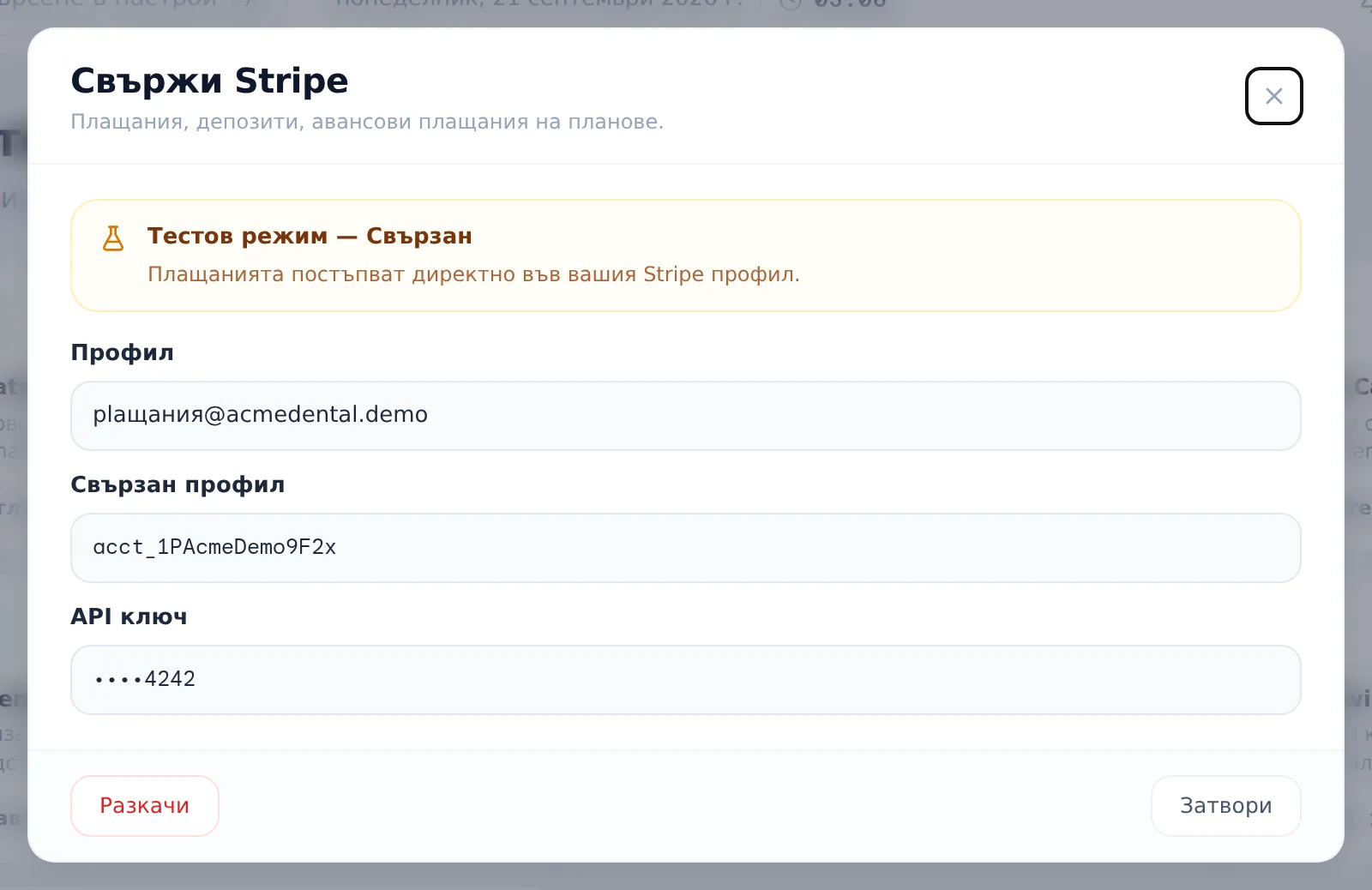
- To disconnect later, reopen the Stripe card and click Disconnect (Разкачи) in the modal footer.
Which visits deserve a deposit
A deposit makes sense for visits where the risk of a no-show or late cancellation is higher:
- The visit runs over 60 minutes (implantology, endodontics, prosthetics).
- The patient is new to the clinic, with no history there.
- The patient is a foreign or dental-tourism patient.
- The patient has missed appointments before.
Short visits (under 30 minutes) and regular patients usually don’t need one.
What amount to ask for
The Deposit amount (Сума на депозита) field prefills automatically with 30% of the appointment’s cost (rounded; if the appointment has no cost, 50 is suggested) — you can adjust it by hand before sending. As a general guideline, 10–20% of the visit value works well for most cases; a higher percentage reads as aggressive, a lower one as symbolic. For example, on a €3,000 implantology package, a €300–500 deposit is a reasonable choice. For pricier or higher-risk visits, you can ask for a larger percentage.
Sending and resending a link
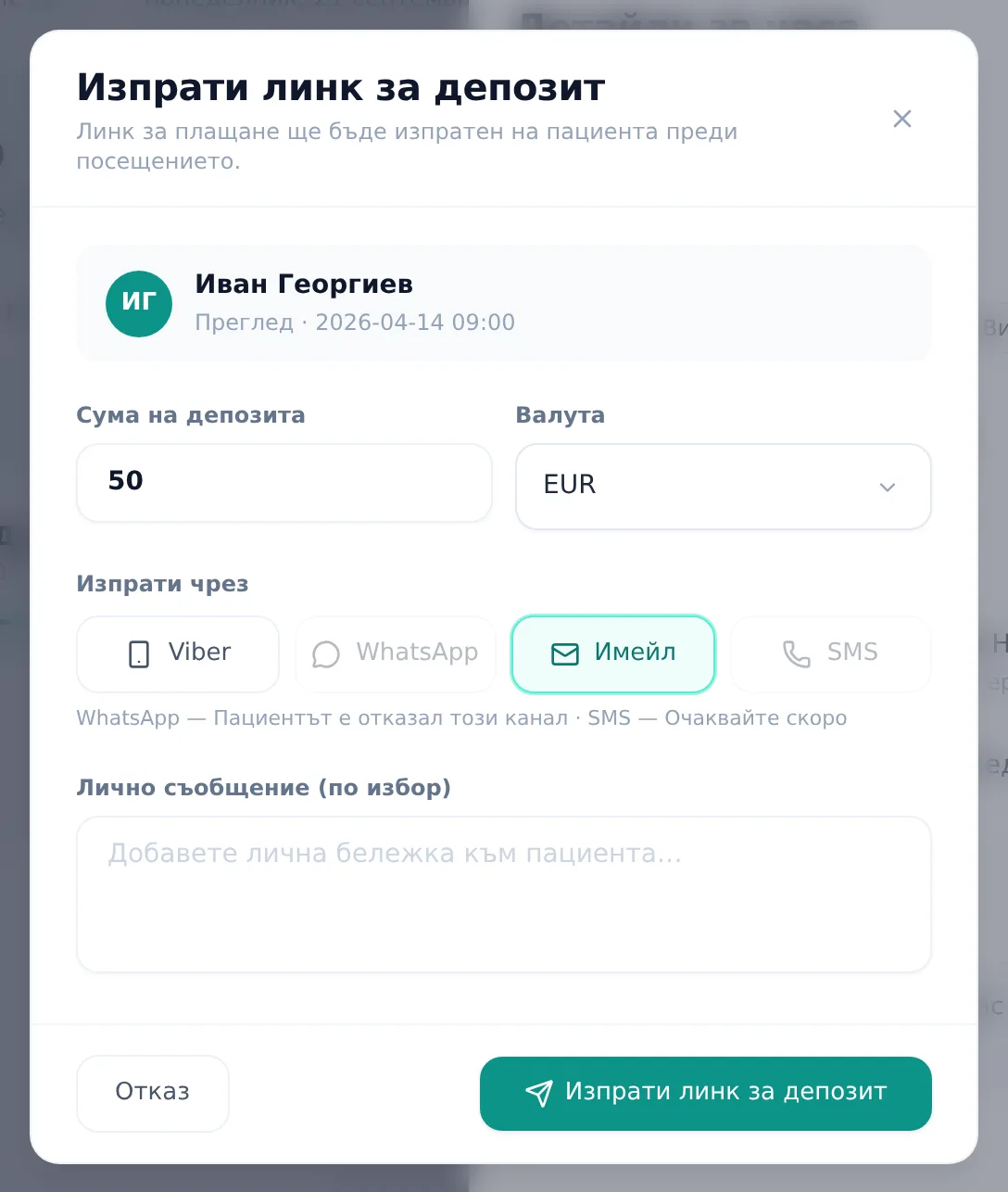
- Open the appointment (only appointments that are Pending („Изчаква“) or Confirmed („Потвърден“)) and, in the deposit block, click Send deposit link (Изпрати линк за депозит).
- Set the Deposit amount (Сума на депозита) and Currency (Валута) (EUR/USD/GBP).
- Pick a channel under Send via (Изпрати чрез) (Viber is preselected, or the first available one): Viber or Email — SMS is greyed out with “Очаквайте скоро” (coming soon). Any channel the patient can’t be reached on is disabled with an explanation: “Няма телефон в профила” (no phone on file), “Пациентът е отказал този канал” (the patient opted out of that channel), “Имейлът липсва или е недостъпен” (no usable email). For Viber, DentaFlow opens Viber with a ready message that you send.
- Optionally add a personal message.
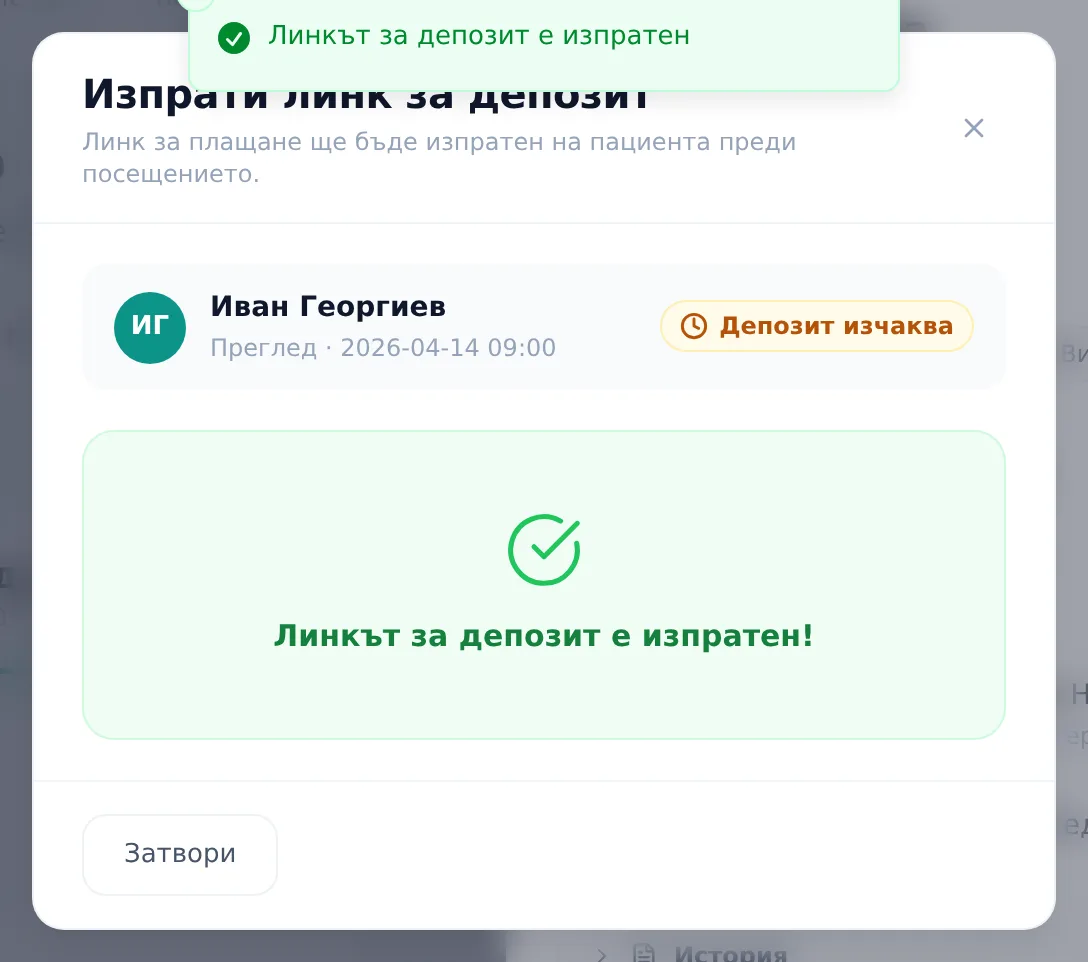
- Click Send deposit link (Изпрати линк за депозит).
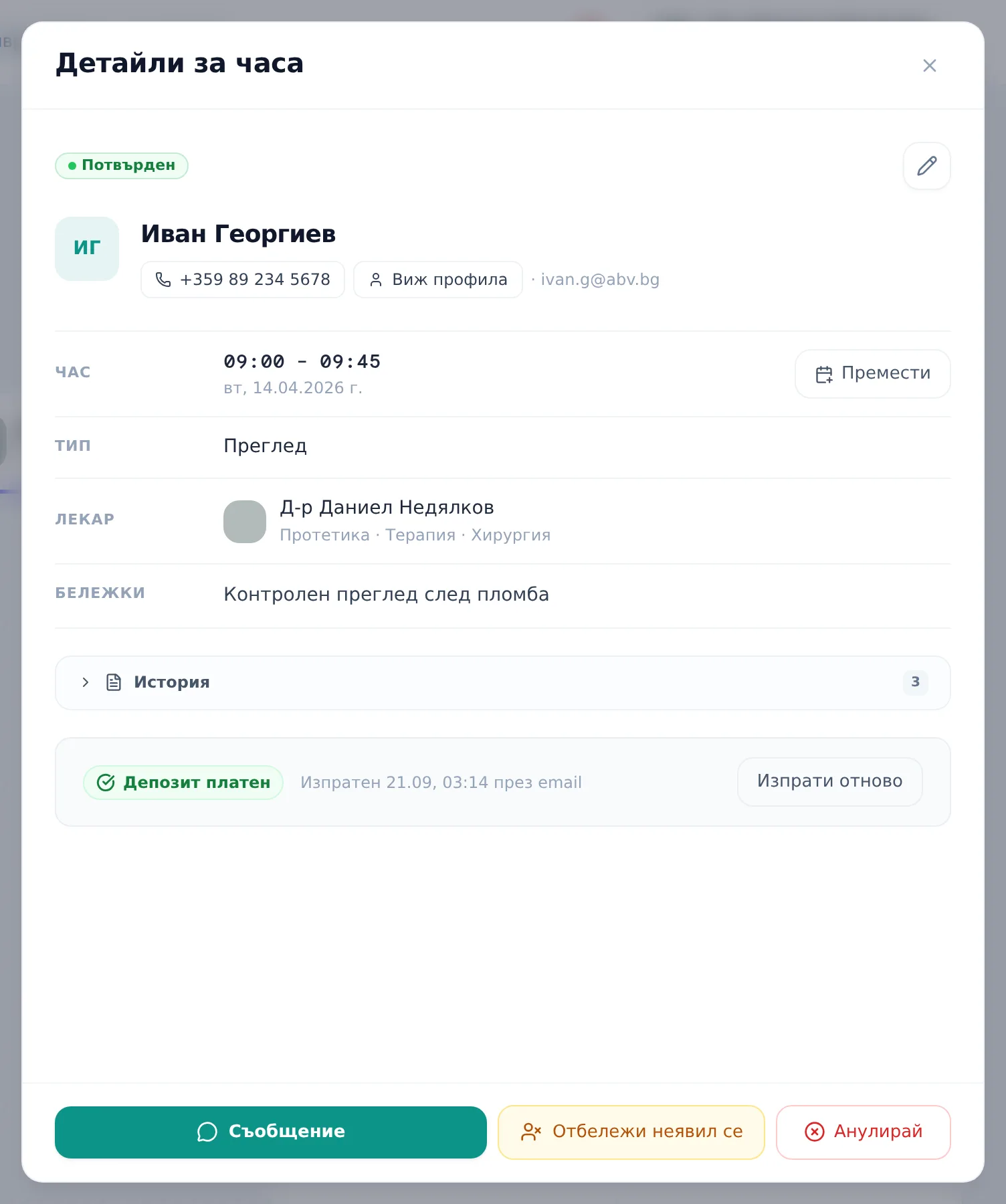
- To resend a link on an appointment that already has one (for example, after it expired), click Resend (Изпрати отново) in the deposit status row — the new link deactivates the old one server-side, so it can no longer be paid.
Checking deposit status
The appointment’s card/modal shows a status badge: Депозит изчаква (sent), Депозит платен (paid), Депозит изтекъл (expired) or Депозит задържан (forfeited — under the clinic’s cancellation policy). Next to the badge you see “Изпратен {when} през {channel}” (sent when, via which channel). Payment confirms almost instantly if the key includes Webhook Endpoints scope; otherwise it can take up to 15 minutes, via a backup sync.
Paid in cash at reception
If the patient pays the deposit in cash, record it on the appointment so the online payment link doesn’t stay open.
- Open the appointment. While the status is Депозит изчаква (sent) or Депозит изтекъл (expired), the deposit row has a Paid in cash at reception (Платено в брой на рецепцията) button.
- Click it. DentaFlow asks „Платено в брой?“ (paid in cash?) and says the online payment link will be stopped.
- Click „Да, платено в брой“ (yes, paid in cash).
What happens next:
- DentaFlow first checks Stripe for an online payment. If the patient has already paid online, the deposit is marked as paid online (not cash) and the patient gets the usual receipt email if they have an email on file.
- Otherwise the online payment link is stopped in Stripe and the deposit becomes Депозит платен (paid). The journal records „Депозит платен в брой на рецепцията“ with the amount.
- If Stripe refuses to stop the link, the deposit is not marked paid and DentaFlow shows an error. Try again.
- If Stripe has been disconnected since the link was sent, the deposit is marked paid but DentaFlow can’t stop the link — stop it in Stripe.
- DentaFlow sends no receipt email for a cash payment.
Frequently asked questions
Why do I get “Stripe не е свързан” when I try to send a link? The clinic hasn’t connected its own Stripe account yet. Deposits never route through a shared DentaFlow account — connect one from Settings → Integrations → Stripe.
Why is SMS greyed out in the channel list? It isn’t available yet — “coming soon.” Today the link goes by email from DentaFlow, or as a ready Viber message that you send.
Can I generate a QR code for the deposit? No — the deposit link is only sent as a chat-app link or by email; the patient opens it on their own device.
What happens if the deposit isn’t paid in time? The link expires 48 hours after sending with no payment, and the appointment automatically shows “Депозит изтекъл.” A payment made shortly after that point (within roughly a 25-hour grace window) still settles correctly.
What happens to a paid deposit on a late cancellation? If the clinic’s cancellation policy is set to forfeit the deposit on a late cancel, a paid deposit is marked “forfeited” — it isn’t refunded automatically. See Cancellation policy.
The patient paid the deposit in cash. What do I do with the link? Click Paid in cash at reception (Платено в брой на рецепцията) on the appointment. DentaFlow stops the link in Stripe so the patient can’t pay twice, and marks the deposit paid.
Can I request a deposit in Bulgarian leva? No — only EUR, USD and GBP are accepted, even if the clinic’s settlement currency is different; the amount is automatically coerced into a supported currency.