DentaFlow up close · Part 1 of 9
A day in a dental clinic with DentaFlow: from the online request to the monthly NHIF report
How a working day runs in a dental clinic on DentaFlow: booking, records, treatment plan, deposit, invoice, patient feedback and the NHIF report.

In short
- One system for the whole day: schedule, records and tooth chart, treatment plans, deposits, invoices, patient feedback and the NHIF report, plus a patient portal.
- Reception stays in control. Online requests are confirmed by a person, but nobody copies bookings from the phone into a notebook anymore.
- Patients see their own information. Plans, invoices and messages reach them in the portal and by email.
- Honestly: automatic SMS and Viber reminders aren't live yet; for now, reminders go by email. Details are at the end.
In this article
- 8:00 — Who booked overnight?
- 8:30 — Who will forget their appointment?
- 9:00 — How does a new patient get into the records?
- 9:15 — Where does the dentist record the exam?
- 10:00 — How does the patient say “yes” to the plan?
- 10:30 — How do you take a deposit for a larger treatment?
- 12:00 — How is the invoice issued?
- 14:00 — Where do patients’ questions go?
- 16:00 — How does the clinic learn what patients think?
- End of the month: how is the NHIF report prepared?
- What does the owner see?
- Does the website have to come from the same team?
- What doesn’t work yet?
- When isn’t DentaFlow for you?
- How do you see this day for your own clinic?
- Sources
- Frequently asked questions
Software websites usually show a list of features. Here we walk through an ordinary working day in a clinic on DentaFlow instead, from the first request in the morning to the monthly report to the National Health Insurance Fund (NHIF, НЗОК). For each step we describe how it usually goes without a system, and what DentaFlow does. At the end we’re honest about what doesn’t work yet.
8:00 — Who booked overnight?
Usually: voicemail, Facebook messages and sticky notes, and the first hour goes on phone calls.
With DentaFlow: the clinic’s website links to an online booking page. The patient chats with the AI booking assistant, which is on by default, or picks a service (such as a check-up, a cleaning, a diagnostic or a cosmetic visit), a day and a free slot from the real schedule. Either way, a request is created. A booking request from the patient portal reaches reception too. In the morning, reception sees every request in one place and confirms or declines each one, with a reason if needed. If the patient left an email address, they get an email either way, with your reason when you decline and have written one. If they didn’t, the clinic contacts them to confirm the slot.
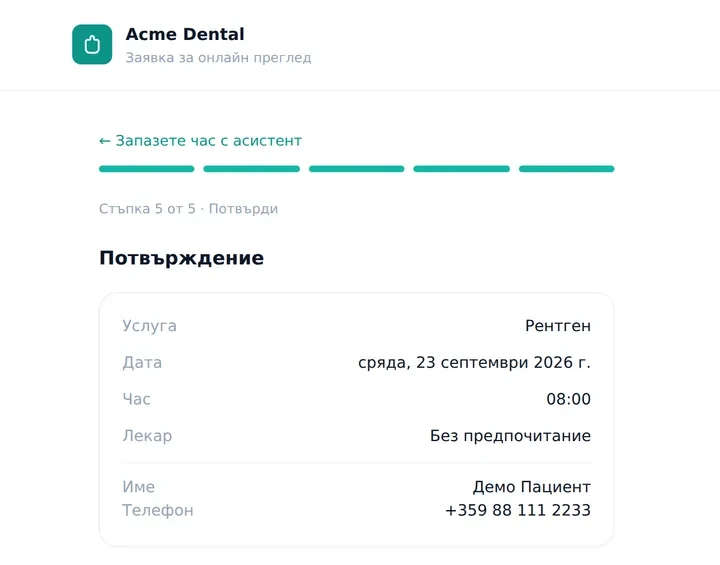
The last step of online booking (Bulgarian interface). The slot is final once reception approves the request.
If the “Waitlist” module is on, a patient who finds no free slot on the chosen day can join the waitlist themselves, from the booking page or the portal. When the clinic cancels a slot at least 24 hours ahead, DentaFlow shows reception the matching patients on the waitlist, and reception chooses whom to offer the slot. We walk through how a request becomes a confirmed appointment, step by step, in “Online booking: from request to confirmed appointment”.
8:30 — Who will forget their appointment?
Usually: reception phones tomorrow’s patients, and when there’s no time, nobody does.
With DentaFlow: 24 hours before a confirmed appointment, the patient gets an automatic email reminder from a template the clinic’s administrator can edit. Deposit and unpaid-invoice reminders work the same way. A recall reminder for the next check-up on the “Email” channel also goes out on its own, up to 7 days before it is due; for a patient without an email address it waits under “Recalls” and the team sends it by hand. Automatic SMS and Viber reminders aren’t live yet.
9:00 — How does a new patient get into the records?
Usually: a paper form that someone types in later, if there’s time.
With DentaFlow: the patient fills in the registration form on a tablet in the waiting room or on their own phone. They enter their personal details, allergies and reason for the visit, and give the required consent to personal data processing. If the clinic works with the NHIF, the form also asks whether the patient is NHIF-insured and which RHIF (regional health insurance fund, РЗОК) they belong to by residence. The monthly NHIF report needs this data. The record is ready before they sit in the chair.
9:15 — Where does the dentist record the exam?
Usually: a paper file, a pen, and X-rays in a separate folder on another computer.
With DentaFlow: the dentist marks findings per surface on an FDI tooth chart. Every tooth keeps its own history and the images tagged to it. From the selected tooth, the dentist can propose treatment straight away. The record opens on any computer, tablet or phone in the clinic, with nothing to install.
This is one of the differences from general-purpose booking systems. Per our comparison as of May 2026, Reservation.Studio has no tooth chart or treatment plans, because it is built for more than 10 kinds of business (comparison). DentaFlow is built only for dentists.
10:00 — How does the patient say “yes” to the plan?
Usually: the dentist explains it verbally, and the patient nods and forgets half of it on the way home.
With DentaFlow: the plan is split into phases, with a price for each procedure and a total. For common cases you can start from a sample template. The patient opens the plan in their portal and taps “Accept plan” or “Request changes”. Both actions are logged in the record.
10:30 — How do you take a deposit for a larger treatment?
Usually: “bring a deposit next time”, or a bank transfer someone has to reconcile by hand.
With DentaFlow: reception sends the patient a deposit payment link in euro, US dollars or British pounds. The money goes straight to the clinic’s own Stripe account, never a shared DentaFlow account. The status on the schedule updates by itself when the patient pays.
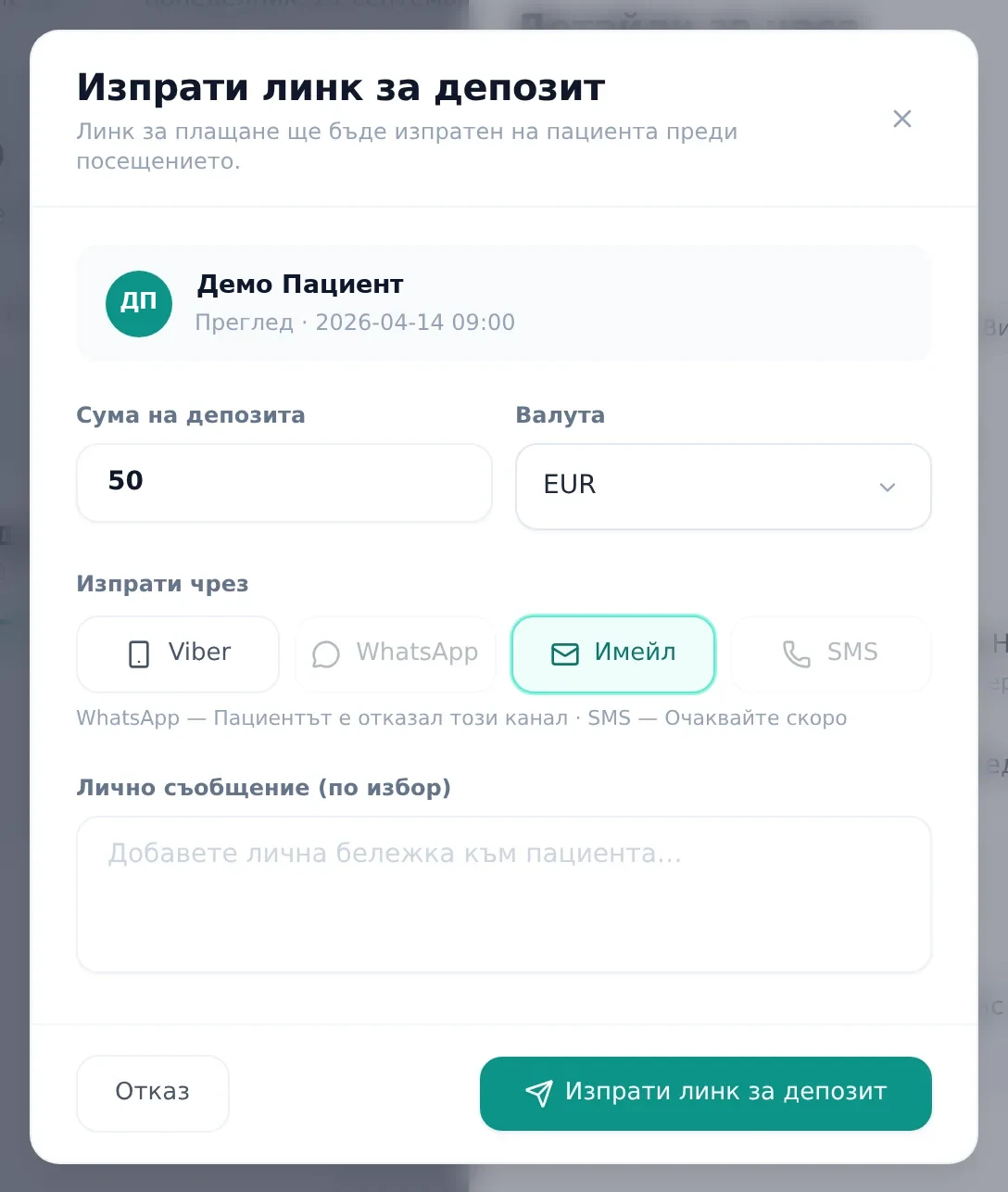
The link goes out by email, or opens ready to send in Viber. SMS isn’t live yet (Bulgarian interface).
12:00 — How is the invoice issued?
Usually: a separate invoicing program, or a paper invoice book at the front desk.
With DentaFlow: each invoice moves through three statuses: draft, issued and paid. It is emailed to the patient and shows up in their portal. From “Monthly statement” you download a CSV of the period’s invoices to give to your accountant.
14:00 — Where do patients’ questions go?
Usually: the dentist’s personal phone, Messenger and email, each channel separately.
With DentaFlow: portal messages and email replies are collected into one conversation per patient. Files the clinic sends in the conversation are saved to the record automatically. Ready-made templates cover the most common messages.
16:00 — How does the clinic learn what patients think?
Usually: nobody asks the patient how the visit went, and the clinic finds out something was wrong only when they don’t come back.
With DentaFlow: a few hours after a completed visit (4 hours by default), the patient gets an email asking them to rate the visit. Ratings are collected on the Reviews page, where the admin sees in time when someone isn’t happy, and the team can call them.
End of the month: how is the NHIF report prepared?
Usually: a spreadsheet, a hunt for codes, and work right up to the last day before the deadline.
With DentaFlow: the month’s report is built from the treatment records already entered. When you enter a visit, you pick the code from the National Framework Agreement (НРД) for each NHIF-paid activity, and DentaFlow shows what the NHIF pays and what the patient co-pays at the prices in force on the activity date. An NHIF activity with no НРД code or no ICD-10 diagnosis doesn’t make it into the monthly report, so the visit screen warns you about both. On the “NHIF claims” page, each month shows how many activities have no НРД code, with a list of the affected visits. For adult patients, the screen also shows how much of the annual NHIF package is used, based on data in DentaFlow, so activities the patient had at other clinics aren’t counted.
Each line in the report shows the activity code, the reimbursed amount and the co-pay. On the “NHIF claims” page, the “Reporting time (НРД Art. 89)” card warns you when the month’s activities get close to or go over the time cap. The card counts only activity recorded in DentaFlow, while the НРД cap applies across all of the dentist’s contracts. DentaFlow generates the XML file that you upload to the NHIF portal — one AMB_DENT file for each dentist who reports under the contract. You download it and upload it yourself; DentaFlow doesn’t submit the report for you. All 403 КСМП procedure codes under Ordinance №42 are in our code catalog. For what the new 2026–2028 НРД brings (in force from 25 September 2026), see our overview.
Before the first report there are two one-off settings. In the profile of every dentist who works under the contract, tick “Reports under the clinic’s NHIF contract” and fill in the УИН (the dentist’s unique ID number). DentaFlow builds a separate file for each ticked dentist. If a dentist with NHIF visits isn’t ticked, the “NHIF claims” page stops and offers to include them in the claim. For every NHIF patient, fill in “RHIF of residence” and “Health region (of residence)” under “Health insurance”. The RHIF field is new and empty for existing patients. If it’s missing, the report stops and names the patient.
Per our comparison as of May 2026, Hipokrat is installed on a computer and covers general practitioners, specialists, dentists and pharmacies (comparison). DentaFlow runs in the browser and is built only for dental clinics.
What does the owner see?
Usually: the numbers live in the owner’s head or in reception’s notebook.
With DentaFlow: the “Analytics” section shows:
- total revenue, and revenue by dentist and by treatment type;
- new patients;
- the collection rate;
- patients by age group.
Every section exports to CSV.
The team works in three roles: Admin, Front Desk and Doctor. If you turn on the “Audit log” module, the admin can see who created, changed, deleted or sent what.
Does the website have to come from the same team?
No. Patients meet the clinic for the first time on its website, but the website is an optional module in DentaFlow. A Template website is +19 EUR a month, and a Custom website by the MAGVZN studio, the same team that builds the software, is quoted and agreed separately. Either way, the “Book now” button leads straight to DentaFlow’s online booking, with free slots from the real schedule. If you keep your current website, you put the same link on it. More in “Website and software from one team” and on the pricing page.
What doesn’t work yet?
We’d rather say it here than have you find out in the demo:
- Automatic SMS and Viber reminders aren’t live yet. For now, reminders go by email.
- The patient side — the portal, online booking, the intake form and the post-visit rating — is in Bulgarian, English, German, Russian and Italian. German, Russian and Italian are machine translations a translator hasn’t reviewed yet. The staff app is in Bulgarian and English only, and patient emails are in Bulgarian for now.
- Paying an invoice online: the “Pay” button in the portal doesn’t charge a card yet, so invoices are paid at the clinic. DentaFlow doesn’t issue fiscal receipts or send e-invoices to the National Revenue Agency (НАП).
- NHIF report: DentaFlow generates the XML file that you upload to the NHIF portal — one file for each dentist under the contract. Signing and uploading it stay with you.
- Tooth chart: no periodontal charting and no DICOM viewer. Images are downloaded and opened in your usual viewer.
- Patient memberships (the clinic’s own membership plans) don’t exist yet.
- Mobile app: there’s no separate app. DentaFlow is a web app optimized for phones.
When isn’t DentaFlow for you?
- If you want fully offline software on the clinic computer. DentaFlow runs only in the cloud.
- If you need automatic SMS reminders from day one. They aren’t live yet.
How do you see this day for your own clinic?
- Book a 15-minute live walkthrough. We go through the day on sample data and answer your questions.
- Prepare an export of your patients from your current software in CSV or Excel. When you start, we import it with you, with a check for duplicate national ID numbers (ЕГН).
- If you have an NHIF contract, tell us in the demo how you report today and how many dentists work under the contract. We’ll show you the report, with a separate XML file for each dentist, and what you need to fill in before it can be built (the patients’ RHIF and the tick in each dentist’s profile).
Sources
Product descriptions follow the articles in the DentaFlow Help Center, checked on 4 October 2026:
- online booking, booking requests, waitlist;
- registration form, tooth chart, treatment plans, plan in the portal;
- deposits, invoices, invoices in the portal, messages, Smart Review, reviews;
- NHIF reports, analytics, roles, audit log;
- patient import, data export.
The email reminder 24 hours before the visit, the НРД code when you enter a visit, the annual NHIF package counter and the “Reporting time (НРД Art. 89)” card aren’t described in those articles yet. We describe them from the app as of 4 October 2026. The time cap follows Art. 89 and the prices follow Art. 105 of the National Framework Agreement for dental activities No. РД-НС-01-00-5 of 16 September 2026 (State Gazette No. 88 of 25 September 2026), read on 4 October 2026.
Separate XML files per dentist, the “RHIF of residence” field, the ICD-10 diagnosis as a condition for the report, the “Reports under the clinic’s NHIF contract” tick, patients joining the waitlist themselves and the reason on a declined request are described from the app as of 5 October 2026, not from the Help Center article on NHIF claims.
Prices and modules follow the pricing page, read on 3 November 2026.
Competitor facts come from our comparison pages and are public as of 18 May 2026.
Questions
Frequently asked questions
Do I need to install anything?
No. DentaFlow runs in the browser on a computer, tablet or phone. The only local piece is a small Windows helper for signing with a qualified e-signature (КЕП).
Can I bring my patients over from other software?
Yes, you import them from CSV or Excel. Duplicate national ID numbers (ЕГН) are detected, and you choose whether to skip the record or fill its empty fields. Treatment history from other software isn't imported automatically yet.
What happens to our data if we leave?
You can export all of the clinic's data as a ZIP file at any time. If you have a website from us, it stays yours.
How much does it cost?
The base subscription is 39 EUR a month incl. VAT and includes one dentist, NHIF and online booking. Each additional dentist is +15 EUR, and the website, AI and payments are optional modules. Prices and the configurator are on the pricing page.
In DentaFlow
Features from this article
- Online booking Requests from your website, confirmed by reception in one click Patients pick a slot from the real schedule or, if you switch it on, chat with the AI assistant. You confirm, and they get an email. See how it works
- Treatment plans Phased, priced plans the patient accepts in the portal Sample templates for common cases. "Accept plan" or "Request changes" in the portal updates the plan's status, and the clinic is notified. See how it works
- NHIF report The monthly report is assembled from your NHIF visits The NRD code is chosen during the visit and the amounts come from the 2026–2028 NRD prices. See how the path to the XML file is built. See how it works
Part 1 of 9
DentaFlow up close
Next part: Website and software from one team See how it works
- 01 A day in the clinic with DentaFlow You are here
- 02 Website and software from one team
- 03 Online booking without the phone
- 04 The NHIF report: from treatment record to XML Coming
- 05 Tooth chart and treatment plans
- 06 The patient portal Coming
- 07 Reminders and one conversation per patient Coming
- 08 Deposits and invoices Coming
- 09 The numbers the owner sees Coming
More from this section
-
 Switching dental software: a practical migration plan A patient list is not the entire record. A practical plan for exports, a trial import and moving to new software while keeping access to the old history.
-
 Dental software pricing in Bulgaria: a 2026 cost guide How to compare offers with the same scope and calculate your first- and second-year costs before you choose dental software.
-
 КЕП for НЗИС in 2026: cloud or smart card? A guide for dentists What НЗИС and the dental framework contract (NRD) say, what we know about a cloud КЕП, what your computer needs and what a КЕП costs.
Dental Pulse · DentaFlow
The system that runs the clinic.
With a website patients trust.
Booking, treatments, invoices, the NHIF report and a patient portal. A clinic website from the same team, if you need one.