The digital intake form
The digital intake form is a public page where a new patient creates their own record before ever setting foot at reception. This guide covers what it walks the patient through, how to hand it to a patient, and what staff see once it’s submitted. The app screenshots show the Bulgarian interface; every label below gives the Bulgarian original in parentheses.
At a glance
- The form lives at
/intake(Регистрация на пациент) — public, no login. The link (with the clinic in the address) is emailed to a new patient when you confirm their first appointment, and it also works as a front-desk tablet form. - 4 steps (the progress bar stays pinned at the top while a long step scrolls, and each step is split into titled cards): personal details → medical information → visit reason → privacy and consent.
- The data-processing consent is required; marketing and third-party research consents are optional.
- The form recognises a returning patient by phone or email together with name and date of birth, and adds the answers to the same record instead of creating a second one.
- A submission appears immediately in Patients, with the visit reason and notes folded into the profile.
The patient fills out the form
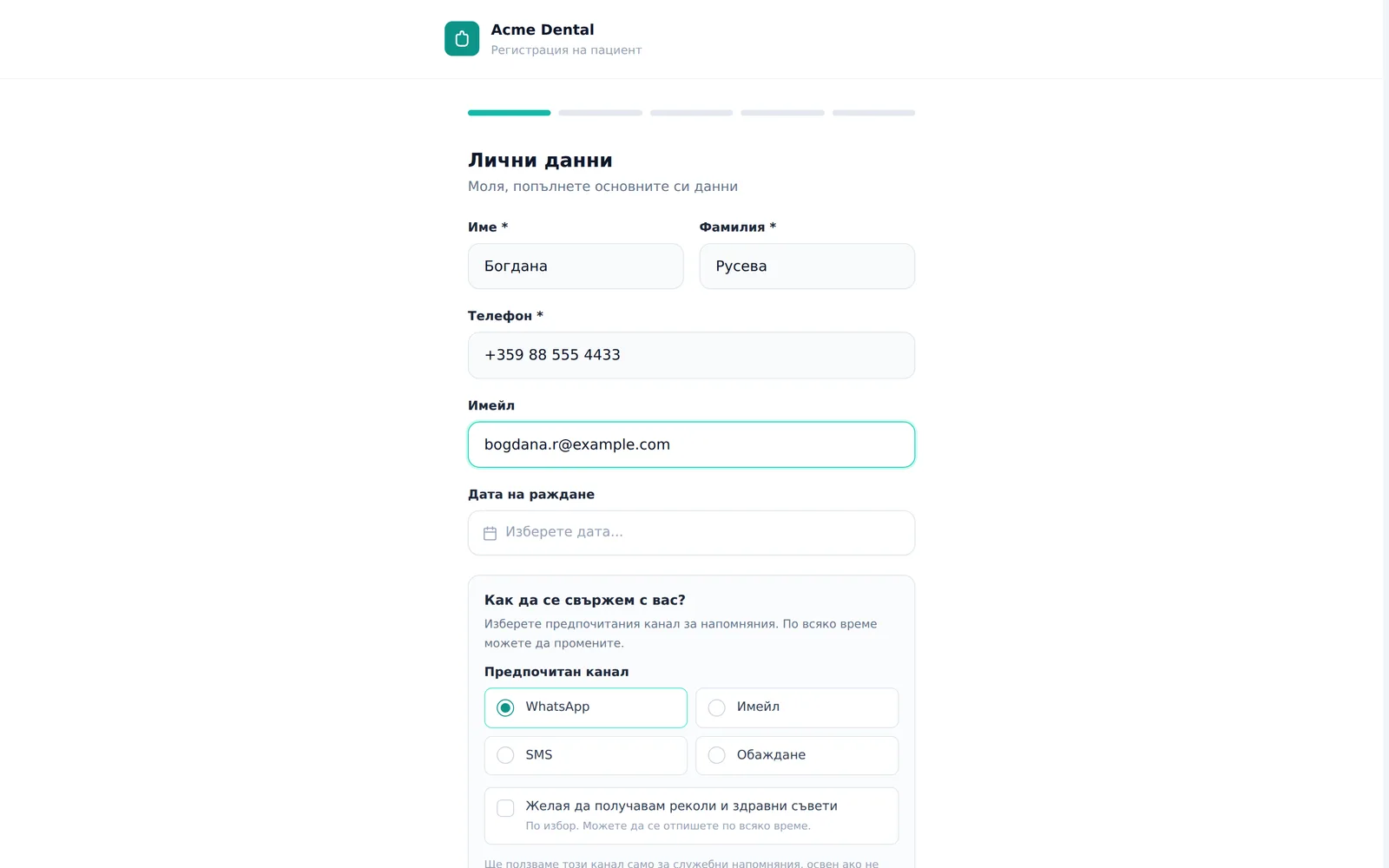
- Step “Personal details (Лични данни)”: enters First name (Име), Last name (Фамилия), Phone (Телефон), optionally Email (Имейл) and Date of birth (Дата на раждане), and, in the separate card How should we reach you? (Как да се свържем с вас?), picks a preferred contact channel (Email / Viber / SMS / Phone call — Имейл / Viber / SMS / Обаждане), plus an optional marketing opt-in checkbox.
- Step “Medical information (Медицинска информация)”: ticks any common allergies (Penicillin, Lidocaine, Aspirin, Latex, Ibuprofen — Пеницилин, Лидокаин, Аспирин, Латекс, Ибупрофен) and adds free-text notes; if the clinic has NHIF enabled, they can optionally declare NHIF insurance status here too (a separate “Health insurance (НЗОК)” card).
- Step “Reason for visit (Причина за посещението)”: picks one of 8 reasons (Regular check-up, Pain, Cleaning, Aesthetics, Orthodontics, Emergency, Prosthetics, Other — Редовен преглед, Болка, Почистване, Естетика, Ортодонтия, Спешно, Протетика, Друго) and adds details.
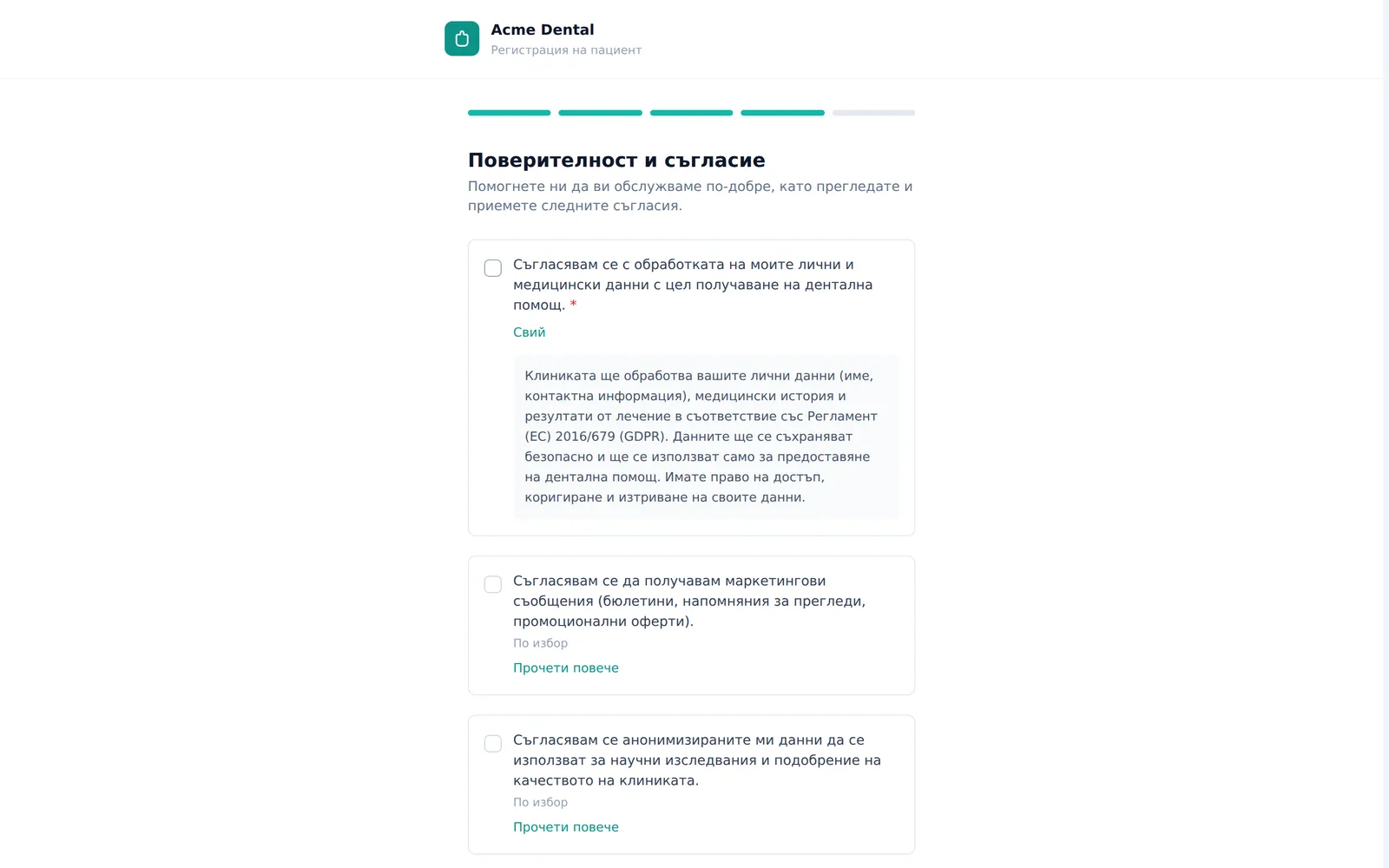
- Step “Privacy and consent (Поверителност и съгласие)”: must check the data-processing consent (required — blocks continuing without it); marketing and third-party research consents are optional. On the public link they also complete an hCaptcha check.
- Clicks Submit (Изпрати) — an “All set! (Готови сте!)” confirmation screen with a name/phone/reason/allergies summary appears. If saving fails, an error (“The form was not sent…”) is shown instead and the patient can try again.
What staff see after a submission
- The new patient (or the existing one, if recognised) appears immediately in the Patients (Пациенти) list — the visit reason and free-text notes are folded into their Notes (Бележки) (medical notes) field, prefixed “Complaint at booking” / “Additional patient information” (Жалба при записването / Допълнителна информация от пациента — the prefix is in the language the patient used). For a returning patient the new text is appended under a dated divider (”— Анкета DD.MM.YYYY —”) and the old notes are kept.
- Open the patient’s profile to see allergies, insurance status and consent timestamps already populated.
Handing the form to a patient
- It is emailed automatically (template “Pre-visit intake form” — Анкета преди първото посещение) when you confirm the first appointment of a patient who has no visits yet and has not been sent the form. The link looks like
/intake?clinic=<clinic>— without the clinic in the address an anonymous visitor gets an error (“The link is missing the clinic…”). - If the clinic uses its own form (Google Form, Typeform, a website), put its link in Settings → Online booking → Pre-visit intake form → Intake form URL (Настройки → Онлайн записване → „Анкета преди първото посещение“ → „URL на анкетата“) and the email will point there. Leave it empty to use the built-in DentaFlow form.
- On a front-desk tablet, open it while signed in to the clinic — no
?clinic=is needed and hCaptcha is not asked — and the patient fills it in on the spot instead of on paper. - The page isn’t linked from the sidebar — it’s reachable only by direct link.
Frequently asked questions
Will the form create a duplicate if the patient is already in the system? Not when the details match: the form looks for the same patient by phone or email together with name and date of birth (a missing date of birth on either side does not block the match). Nothing is overwritten — notes are appended under a date, allergies are merged, empty fields are filled in. Family members who share a phone but have a different name or date of birth stay separate patients. If the patient types a different name or a new phone and email, a new record is created — check Patients. The form does not tell the patient whether they were recognised.
Is the CAPTCHA a reliable spam guard? On the public link the hCaptcha token is verified on the server and a submission without a valid token is refused; there is also a limit on how many forms one address can send per hour. On a tablet with a signed-in user hCaptcha is not asked — the session is the guard.
What exactly happens with the consents? Three separate GDPR entries are recorded — data-processing, marketing and third-party — each with its own version and timestamp (set by the server). Only the data-processing consent is required and blocks submission. For a returning patient the entries are added to the existing ones.
Where does the visit reason the patient types go? It’s folded straight into the patient’s general medical notes field — there’s no dedicated “visit reason” column, so it’s visible to any staff member who can view the profile, not siloed anywhere separate.
Can I use the form instead of adding a patient manually at reception? Yes — on a front-desk tablet or kiosk, the patient fills it in themselves while they wait. See also Patient records for adding a patient manually.