Failed payments & restricted access
This guide covers what happens if the clinic’s card for its DentaFlow subscription is declined — the app doesn’t cut access off immediately, it narrows it gradually until payment is resolved. It applies to the Admin role, but every role sees the banners once restrictions start affecting their work. The app screenshots show the Bulgarian interface; every label below gives the Bulgarian original in parentheses.
At a glance
- A past-due payment moves through stages: Warning → Read-only → Export-only → Archived. Separately there is “Access suspended” — switched on by hand by the DentaFlow team and independent of payment.
- Only Admin can open the billing portal and fix the card.
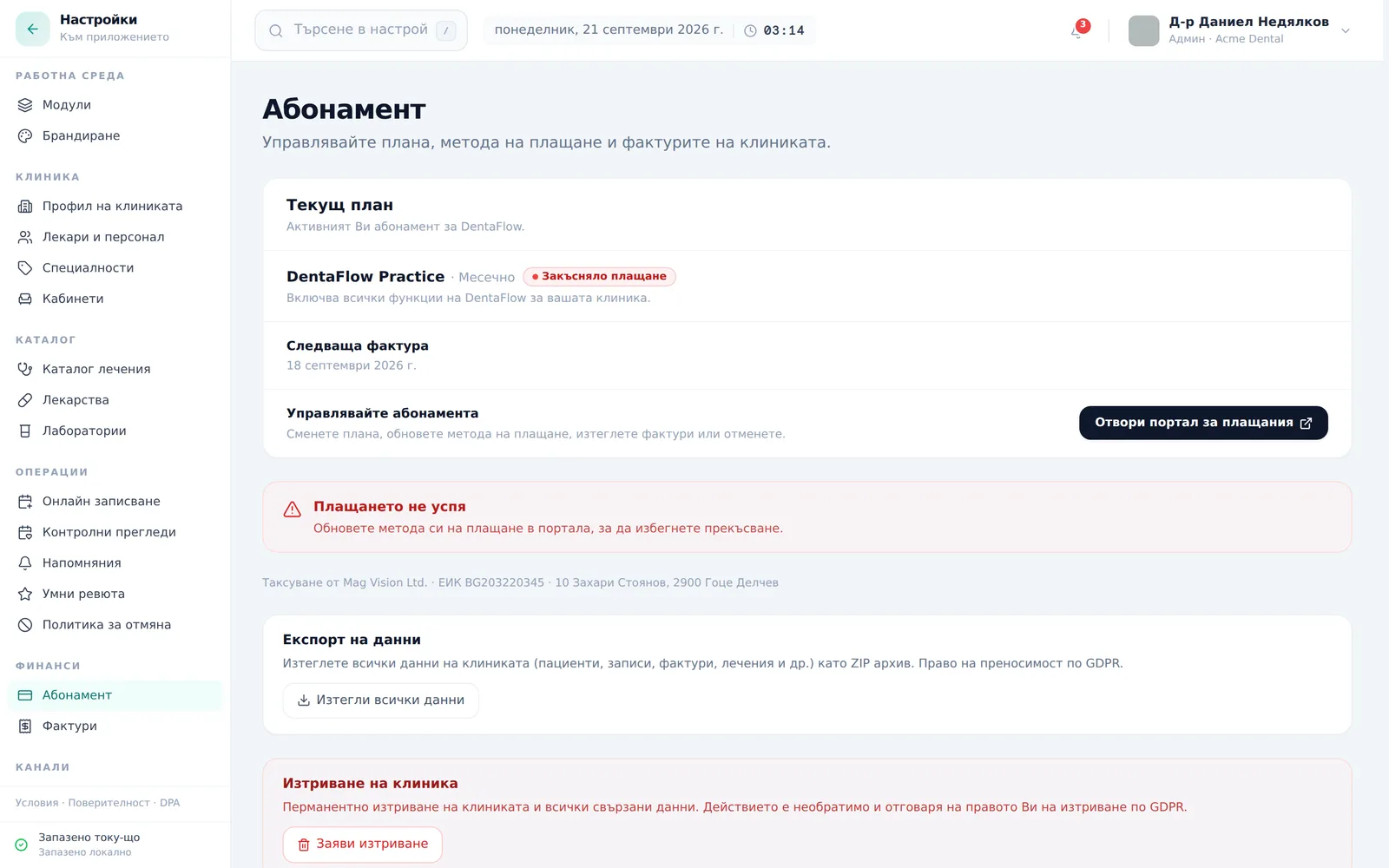
- The fix is the same at every stage: the Update billing (Обнови плащане) button on the banner at the top; in Settings → Subscription the button is Open billing portal (Отвори портал за плащания).
- Data is never deleted for a failed payment — only saving is blocked or access is redirected. Deleting the clinic is a separate, voluntary action with a 30-day grace period (see Deleting your account).
- A subscription the clinic pauses from the Stripe portal stays indefinitely at the “Warning” stage — it doesn’t climb the ladder on its own.
The restriction ladder
Here’s what still works at each stage of a past-due payment:
| Stage | When it happens | What still works | What’s blocked |
|---|---|---|---|
| Warning | Past due 0–7 days, paused from the Stripe portal (no time limit), or past due with no date | Everything — banner only at the top of the app | Nothing |
| Read-only | 7–14 days past due | Viewing and printing all data; Settings, including export | Saving appointments, patients, invoices (save, issue, mark paid, void), visits, treatment plans, lab orders, prescriptions, recalls, document uploads, waitlist entries and instalments — with the toast “Read-only mode — pay the outstanding balance to resume saves.” |
| Export-only | 14–30 days past due | Same as Read-only; the GDPR data export from Settings → Finance → Subscription | The same saving as in Read-only |
| Archived | 30+ days past due, or status canceled/incomplete_expired/unpaid, or no subscription | Only the renewal page, Settings (including Subscription and the data export), login/logout and first-time setup | Every other page of the app — redirected to the renewal page |
The Export-only banner says the rest of DentaFlow is locked; in practice this stage blocks the same saving as Read-only — viewing is not blocked until the account is archived.
If payment is never confirmed right after signup (an “incomplete” status, shown as „Незавършено плащане“), the app shows a blue banner with a Complete signup (Завърши регистрацията) button instead of the ladder above — the ladder only starts once the subscription has been active at least once. The button opens the same billing portal.
If the app cannot read the subscription status, it shows a banner “Subscription status is temporarily unavailable. Features remain accessible.”

How to fix it
- Notice the banner at the top of the app — its color and text show which stage the clinic is on.
- Click Update billing (Обнови плащане) on the banner (Admin). If the banner is not in front of you, open Settings → Finance → Subscription and click Open billing portal (Отвори портал за плащания). If the portal cannot be opened you see “Could not open the billing portal. Try again in a moment.”
- In Stripe’s hosted portal, enter a new card or confirm payment.
- If you expect resolving the payment to take a while, download a safety copy now through Download all my data (Изтегли всички данни) — see Data export (GDPR).
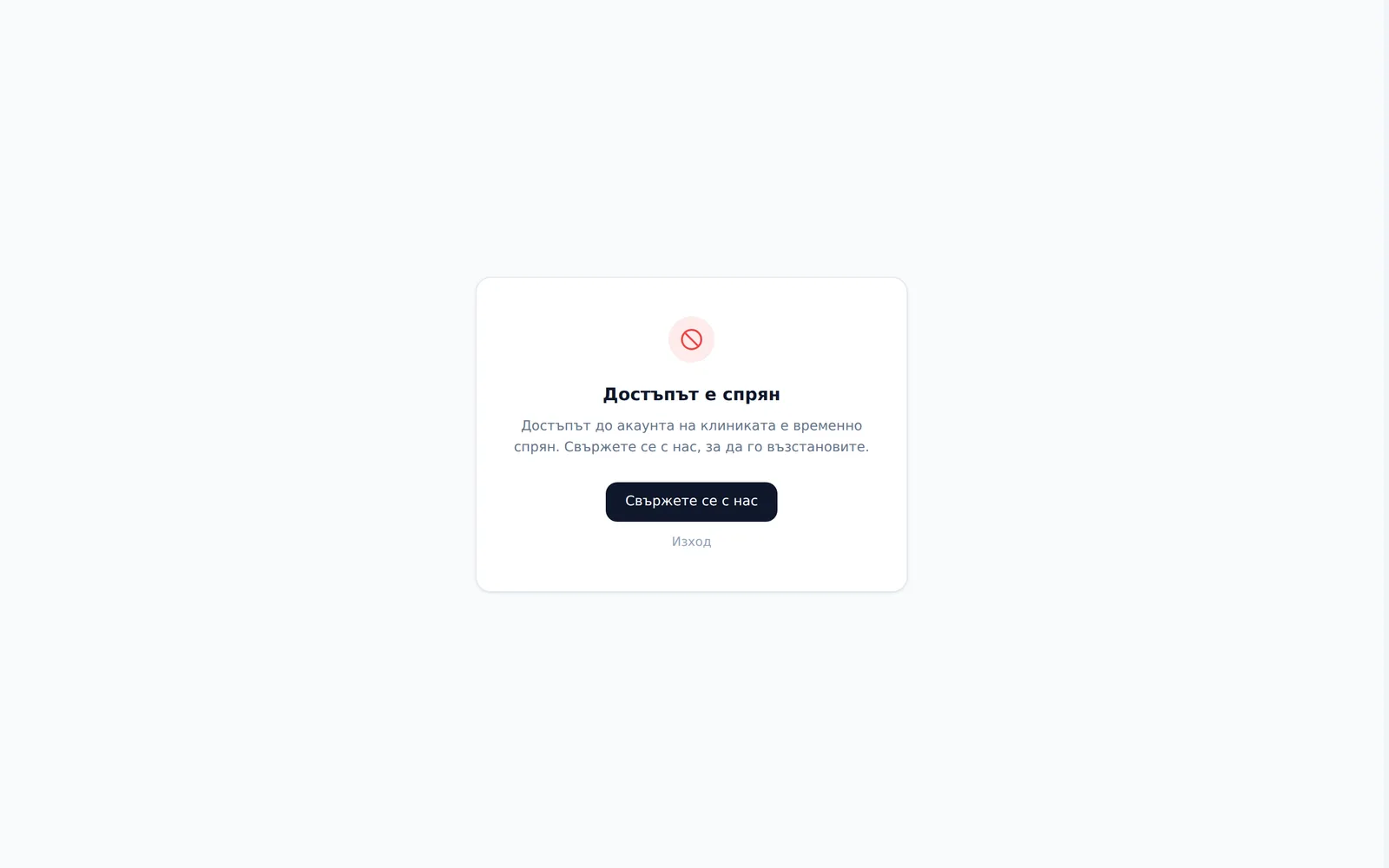
- If the account is archived you are redirected to the renewal page. With an unpaid subscription or a payment 30 or more days past due, an Admin pays from there with Open billing portal (Отвори портал за плащания) and the plan continues unchanged. With a canceled subscription, an expired signup or no subscription, click Write to support@dentaflow.bg (Пишете на support@dentaflow.bg) and we will renew the subscription for this same clinic, with its data. Don’t order on dentaflow.bg: a purchase with the same email is held and refunded, and a purchase with another email creates a new, empty clinic (see Subscription & plans). If access was suspended by hand by the DentaFlow team, you see an “Access suspended” („Достъпът е спрян“) page with a Contact us (Свържете се с нас) link and Log out (Изход) — write to us.
Frequently asked questions
Will we lose the clinic’s data if payment stays past due too long? No. The archived status redirects access and a suspension blocks it, but neither deletes data. Deleting the clinic is a separate, voluntary action with a 30-day grace period — see Deleting your account.
Who can pay the bill if I’m Front Desk or Doctor? Only Admin — the billing portal opens only for that role; if another role tries, it gets a message that only a clinic admin can manage billing.
What exactly stops working at the “Read-only” and “Export-only” stages? Saving appointments, patients, invoices (including issuing, marking paid and voiding), visits, treatment plans, lab orders, prescriptions, recalls, documents, waitlist entries and instalments. Viewing and printing existing data keeps working.
We paused the subscription from the Stripe portal — will that escalate to “Archived”? No. A pause the clinic starts stays indefinitely at the “Warning” stage — you have to resume it yourself from the Stripe portal.
What’s the difference between “Archived” and “Access suspended”? “Archived” results from an unpaid or canceled subscription: everything except the renewal page and Settings redirects to the renewal page. Follow step 5 above. “Access suspended” is set by hand by the DentaFlow team, does not depend on payment, and is a dead end with only a contact link and logout.


