Cancellation policy
The cancellation policy defines what happens when an appointment is cancelled or a patient doesn’t show up too close to its scheduled time — a notice window, a late-cancellation fee, and whether a paid deposit is forfeited. Once configured, it’s enforced automatically on every cancellation or no-show on the Calendar, whether staff cancel the appointment or the patient cancels it themselves. It applies to Admin. The settings tab only appears when the Online booking module is enabled. The screenshots below show the Bulgarian interface; every label gives the Bulgarian original in parentheses.
At a glance
- Found under Settings → Operations (Операции) → Cancellation policy (Политика за отмяна), visible only when the Online booking module is enabled.
- You configure a notice window, a late-cancellation fee percentage, a flat no-show fee, and whether a deposit is forfeited.
- Changes save automatically — there’s no separate Save button.
- It applies the same way to every cancellation inside the notice window and every no-show — whether staff cancel the appointment on the Calendar or the patient cancels it themselves; it isn’t a separate manual “charge a fee” button. Declining a still-pending request carries no consequence.
- The Mark as no-show (Отбележи неявил се) button on the Calendar only appears when the policy is on.
- Turning the toggle off hides the fields but keeps the last-configured values for the next time you turn it back on.
Configuring the policy
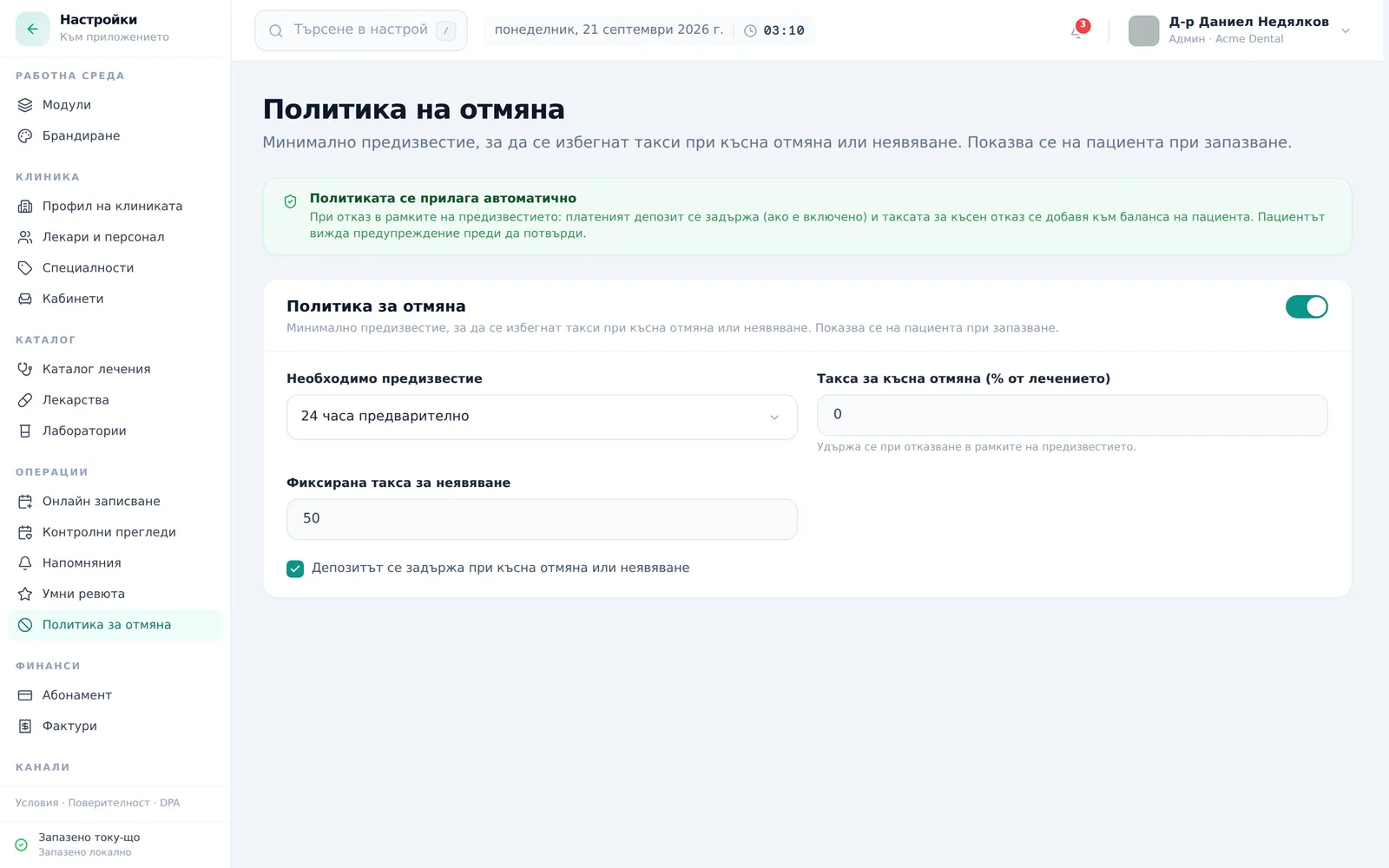
- Open Settings → Operations → Cancellation policy (Настройки → Операции → Политика за отмяна) and turn the toggle on. The banner Policy is enforced automatically (Политиката се прилага автоматично) above it reminds you what the policy does.
- Set Notice required (Необходимо предизвестие) from the dropdown: 4 hours, 12 hours, 24 hours, 48 hours or 3 days before.
- Set the Late-cancel fee (% of treatment) (Такса за късна отмяна (% от лечението)) (0–100%) and the No-show flat fee (Фиксирана такса за неявяване) (an amount in the clinic’s currency).
- Tick Deposit is forfeited on late cancel / no-show (Депозитът се задържа при късна отмяна или неявяване) if a paid deposit should also be forfeited.
- Changes save automatically — there’s no separate save button.
The app starts with the policy on: 24 hours’ notice, 0% late-cancellation fee, a flat no-show fee of 50, and deposit forfeiture on. Review the values and adjust them for your clinic.
How it is calculated. A cancellation is “late” when the appointment is in the future but starts in less than the notice period. The percentage fee is worked out from the price of the service linked to the appointment; if there is no linked service, the deposit amount is used; if there is neither, no percentage fee is charged. Online requests carry the service the patient chose. Appointments you book by hand from the Calendar have no linked service — for them a percentage fee only applies if a deposit is set. The flat no-show fee is charged regardless of price. The fee is added to the patient’s balance, and a paid deposit is marked “forfeited”. A deposit is only forfeited if it was paid and the tick in step 4 is on.
How the policy shows up on the Calendar
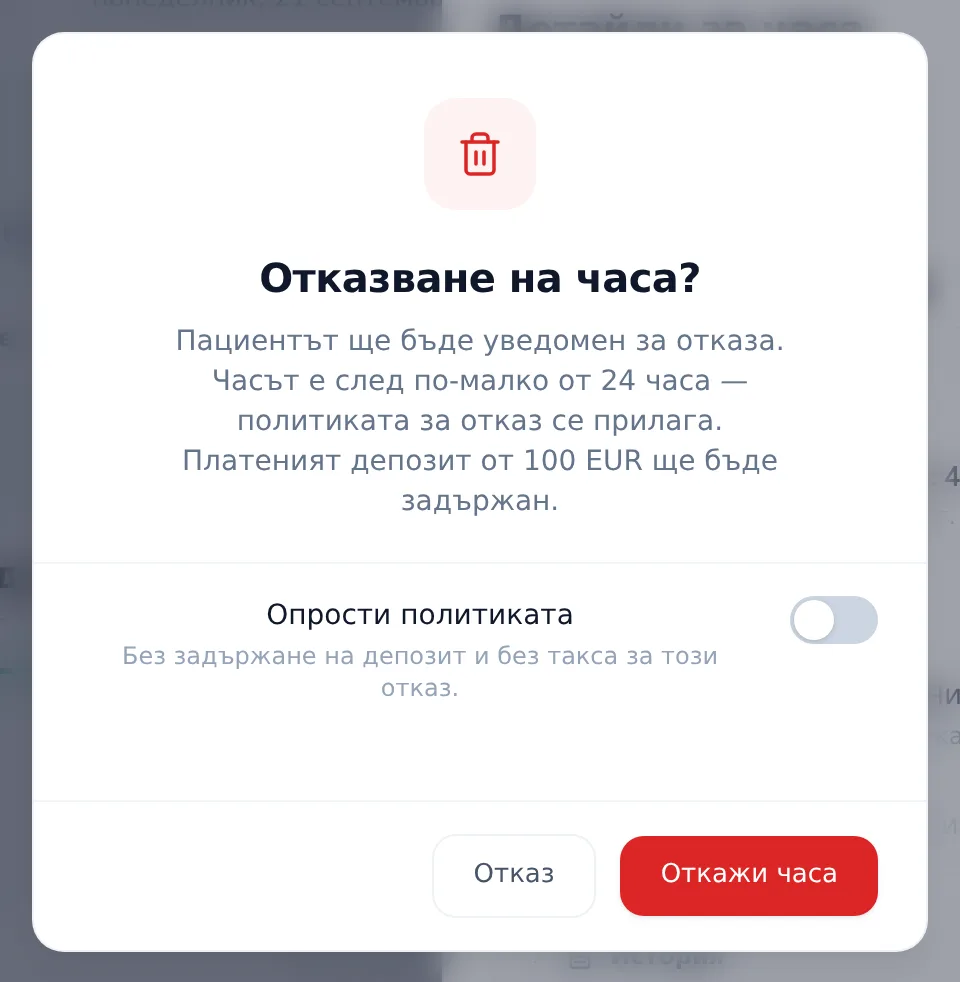
When the policy is on and there is something to forfeit or charge, it appears in the cancel or no-show dialog on the Calendar — with the exact amount to be forfeited and a Waive policy (Опрости политиката) toggle staff can use for a specific case. With no deposit to forfeit and no fee, the toggle isn’t shown. A patient who cancels in the portal sees a warning with the same amounts before confirming, but can’t waive the policy. See Rescheduling, cancelling & no-shows.
Frequently asked questions
Does the policy also apply when staff cancel an appointment manually? Yes — it applies the same way no matter who cancels the appointment or how it was booked. The check is based on how close the appointment time is to the notice window, not on who initiated the cancellation; staff can always waive it for a specific case with the Waive policy (Опрости политиката) toggle.
If I turn the toggle off, do I lose my configured values? No — turning it off only hides the fields from view. The values stay saved and come back as soon as you turn the policy on again.
Why don’t I see a Cancellation policy tab in Settings? The tab only appears when the Online booking module is enabled. Check Settings → Modules. If you turn the module off, the tab disappears but the last saved policy keeps being applied.
Does the deposit refund automatically when I waive the policy? Waiving the policy for a specific appointment prevents the forfeit — the deposit stays paid and isn’t marked forfeited. DentaFlow never refunds a deposit itself: a refund is the clinic’s decision, made outside the app. See Deposit links for the deposit payments themselves. Deposit emails only say that a paid deposit is kept on a late cancellation when the policy is on and the deposit tick box is ticked.
Is there a separate no-show fee on top of the late-cancellation fee? Yes — the flat no-show fee is a separate field from the percentage-based late-cancellation fee; you can set both independently. The flat fee is charged on a no-show, the percentage fee on a late cancellation.


