Workspace modules: turning features on & off
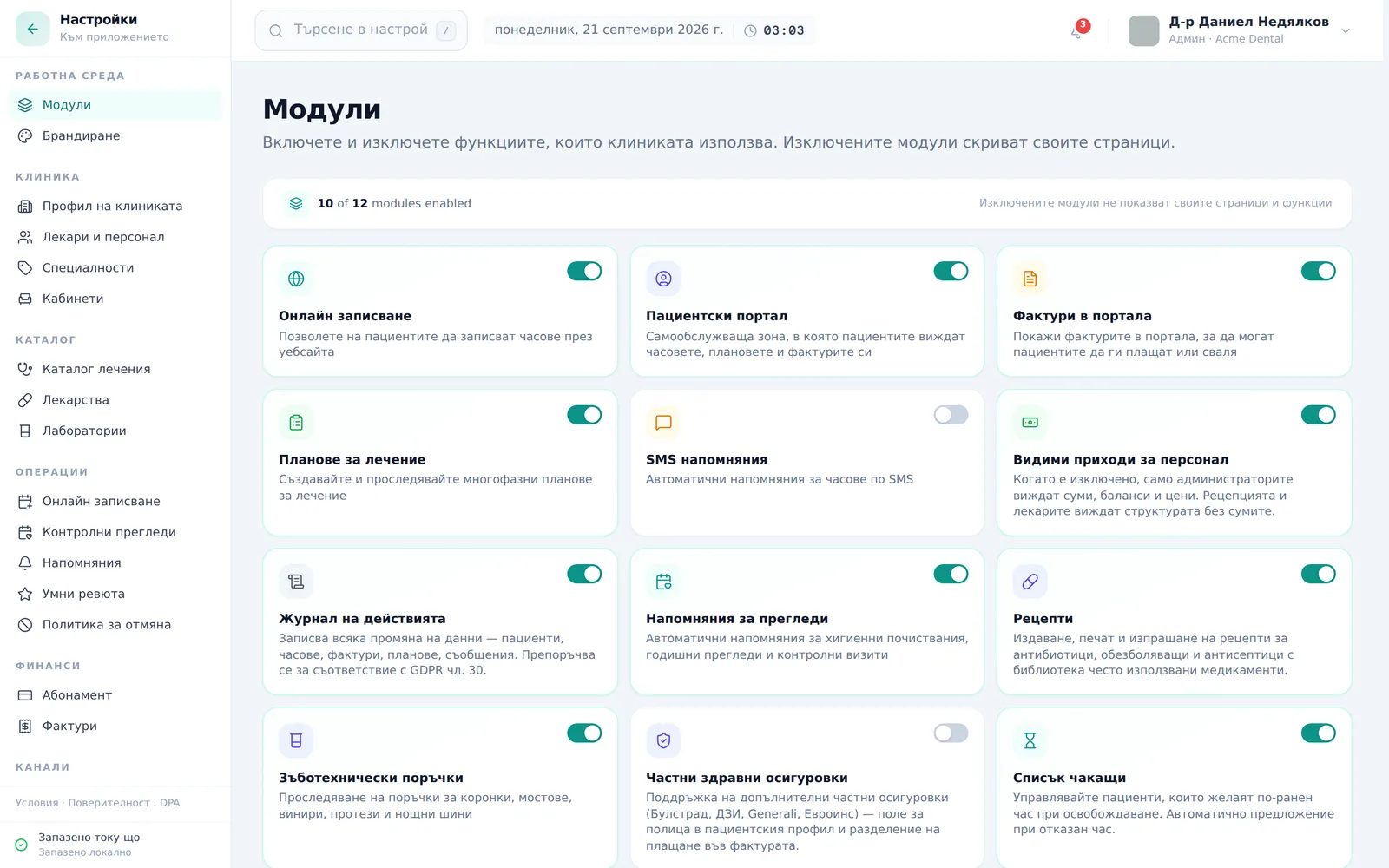
Modules control which features are active for your clinic — from online booking to the waitlist. Disabling a module hides its pages and menus but never deletes data you’ve already entered. This is Admin-only. The screenshots below show the Bulgarian interface.
At a glance
- Settings → Modules (Настройки → Модули) — the first link in the left-hand menu (the „Работна среда“ group). The page Settings opens on by default is Clinic profile (Профил на клиниката).
- A grid of 17 toggles: Online Booking (Онлайн записване), Patient Portal (Пациентски портал), Patient Invoices (Фактури в портала), Treatment Plans (Планове за лечение), SMS Reminders (SMS напомняния), Revenue Visible to Staff (Видими приходи за персонал), Audit Log (Журнал на действията), Recall reminders (Напомняния за прегледи), Prescriptions (Рецепти), Lab orders (Зъботехнически поръчки), Private Health Insurance (Частни здравни осигуровки), Waitlist (Списък чакащи), Instalment plans (Плащане на вноски), Patient documents (Документи за пациенти), Informed consent (Информирани съгласия), AI assistant (AI асистент), AI booking chat (AI чат за записване).
- Off by default (you turn them on): SMS Reminders, Private Health Insurance, Patient documents, Informed consent, AI assistant and AI booking chat. The rest are on.
- SMS Reminders carries a “Coming soon” (Очаквайте скоро) badge and the note “Not sent yet” (Още не се изпращат) — appointment reminders go out by email.
- AI assistant and AI booking chat send data to Anthropic (US), so they stay off until the clinic admin switches them on. While AI booking chat is off, the online booking page shows the form only.
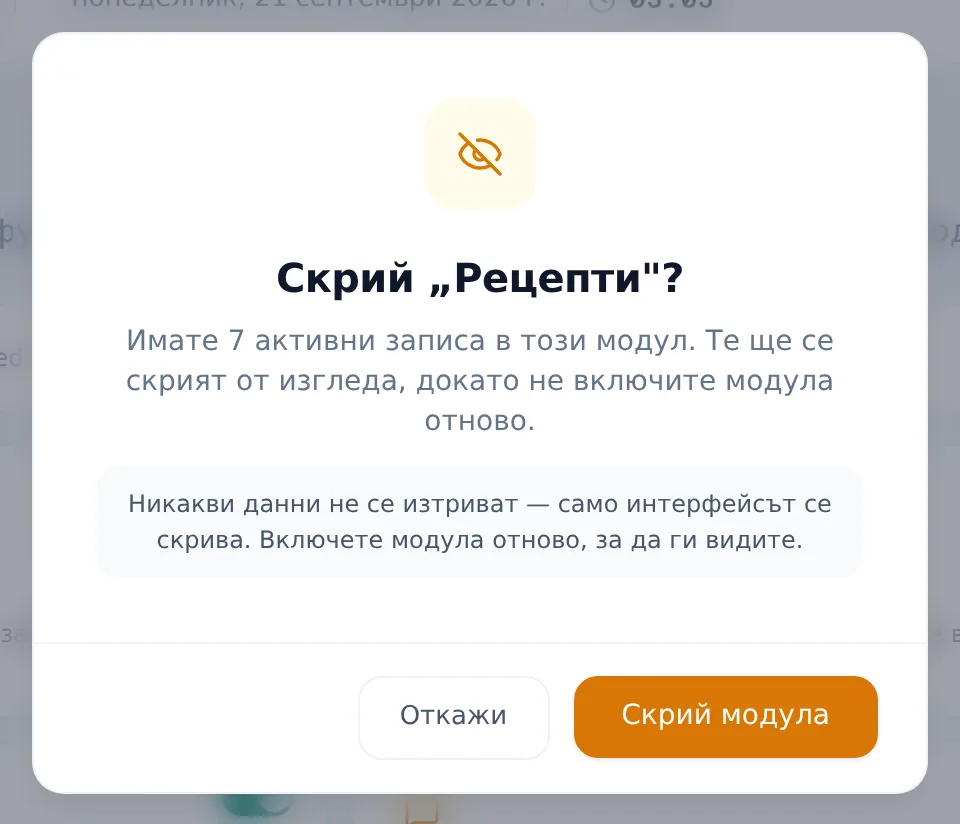
- Turning off a module that already has data shows a confirmation modal explaining the data is only hidden, not deleted.
- Inventory and Services have no toggle — they’re always on.
- A few features have no card in Settings and are switched on per clinic by the DentaFlow team (see “Features that aren’t switched on in Settings”).
Reviewing the modules
- Open Settings → Modules (Настройки → Модули).
- Review the cards — each shows a toggle switch and a short description, and the strip at the top counts the enabled modules.
Turning a module on
- Click a card’s toggle switch to turn the module on.
Turning a module off
- Click the switch to turn the module off.
- If the module already has data (e.g. existing waitlist entries), a confirmation modal appears explaining the impact — the data is only hidden, not deleted.
- Click Hide module („Скрий модула“) to finish disabling, or Cancel („Откажи“) to back out.
Two toggles worth knowing about
- Revenue Visible to Staff („Видими приходи за персонал“) — when it’s off, only admins see amounts, balances and prices; Front Desk and Doctors see the structure without the amounts. Admin always sees revenue.
- Audit Log („Журнал на действията“) — makes the Audit log page and its account-menu link available at all; when it’s off, the link disappears entirely.
- AI assistant („AI асистент“) and AI booking chat („AI чат за записване“) — off by default. Only a clinic admin switches them on, because they send data to Anthropic in the US; the card says exactly which data.
- Informed consent („Информирани съгласия“) — opens the template library and the per-procedure rules (Settings → Consents (Съгласия)). The card notes that issuing and signing consents is available for test patients only for now.
- Patient documents („Документи за пациенти“) — prepares a versioned document from a treatment plan; off by default.
Features that aren’t switched on in Settings
Five flags have no card in Settings and are switched on for a single clinic by the platform owner (the DentaFlow team) only; a clinic admin can’t change them: tablet signing of informed consents, patient emails in the patient’s language, the clinical pathway wizard, consent coverage warnings, and the stock widgets on the dashboard. Until they’re on, the matching screens don’t appear.
Frequently asked questions
If I turn off a module by mistake, do I lose the data? No. Disabling is reversible and never deletes rows — re-enabling brings the data straight back, unchanged.
Why don’t I see Inventory or Services in the modules list? Those two pages have no toggle — they’re always on for every clinic.
Why can’t a colleague see the amounts on Analytics? Check the “Видими приходи за персонал” toggle — without it, non-admins see only treatment counts, not currency amounts.
Why don’t I see “Журнал на действията” in the menu? That module is probably off — turn it on under Settings → Modules and the link will reappear.
Who can manage modules? Admin only — the toggles save through the same admin-only access as the clinic profile. The five platform-owner features above are not available to clinic admins.
Why don’t the AI assistant or the AI booking chat work? They are off by default. The admin turns them on under Settings → Modules, once the clinic is happy for the data to go to Anthropic.


