Profile & privacy
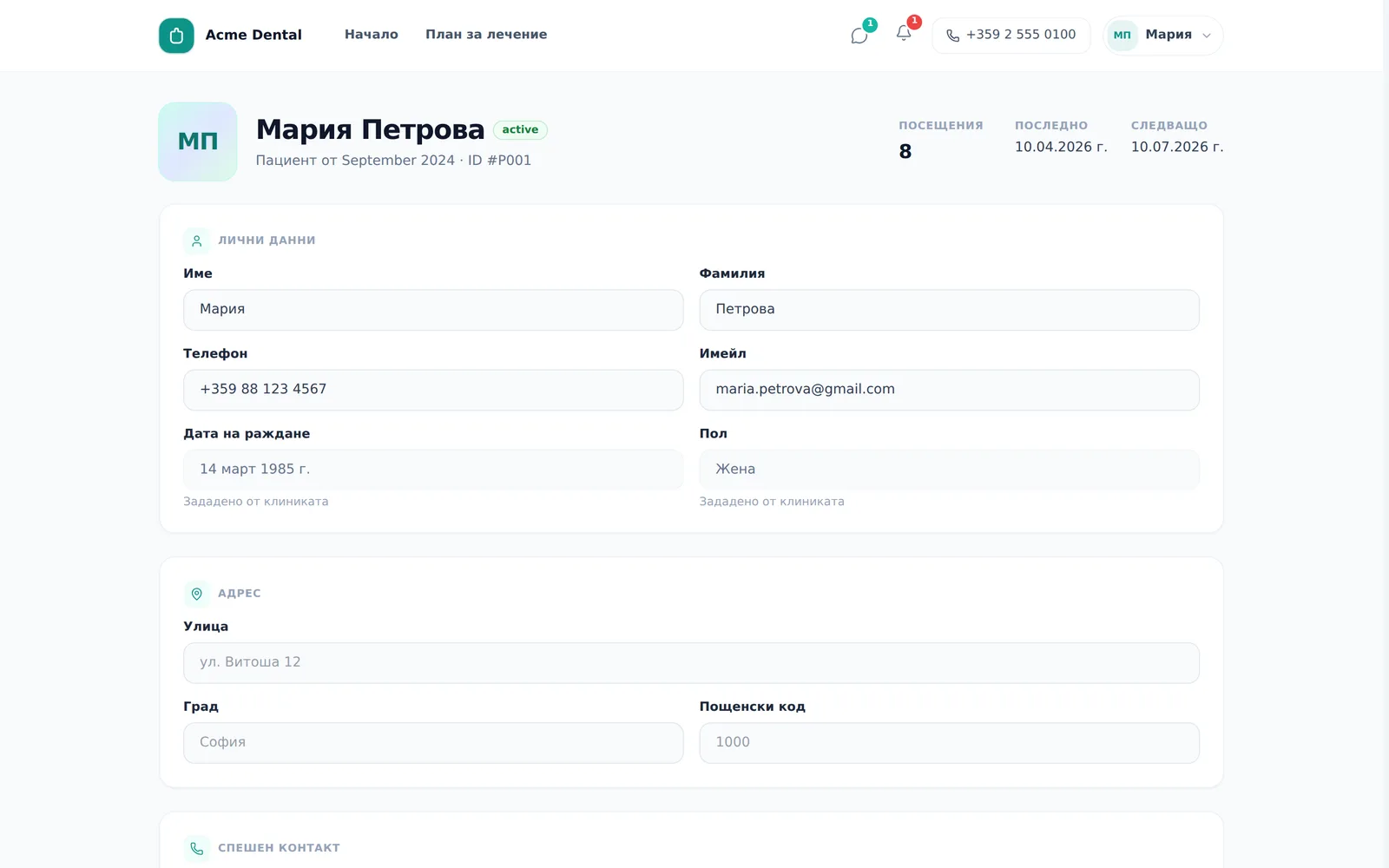
“My profile” (Моят профил) is where you update your contact details, photo, preferred communication channel and password. A few fields — mainly medical information and your date of birth — stay locked to editing by the clinic only, since they feed directly into your clinical and invoice records. The screenshots below show the Bulgarian interface; every label gives the Bulgarian original in parentheses.
At a glance
- You edit your name, phone, email, address, emergency contact and photo yourself.
- Date of birth, gender, allergies and medical notes are view-only — the clinic corrects those.
- Remember to click Save changes (Запази промените) — the floating changes bar disappears if you leave the page without saving.
- Viber and SMS can be picked as your preferred channel, but only email and the portal thread actually reach you today.
- The Do not send via email (Не изпращай чрез имейл) tick stops every email from the clinic to you — reminders, invoices, receipts and invites.
- Changing your password and signing out of this device live in a separate “Account Security” card.
- The portal language isn’t in the profile but in the account menu at the top — there you pick Bulgarian, English, German, Russian or Italian.
Editing your contact details
- Open My profile (Моят профил) from the account menu or your avatar. If you are a patient at several clinics, the profile is your record at the selected clinic — your changes are saved there.
- Click the avatar circle to upload a new photo (auto-resized), or Remove (Премахни) to delete it.
- Edit any editable field: First name (Име), Last name (Фамилия), Phone (Телефон), Email (Имейл), address, emergency contact.
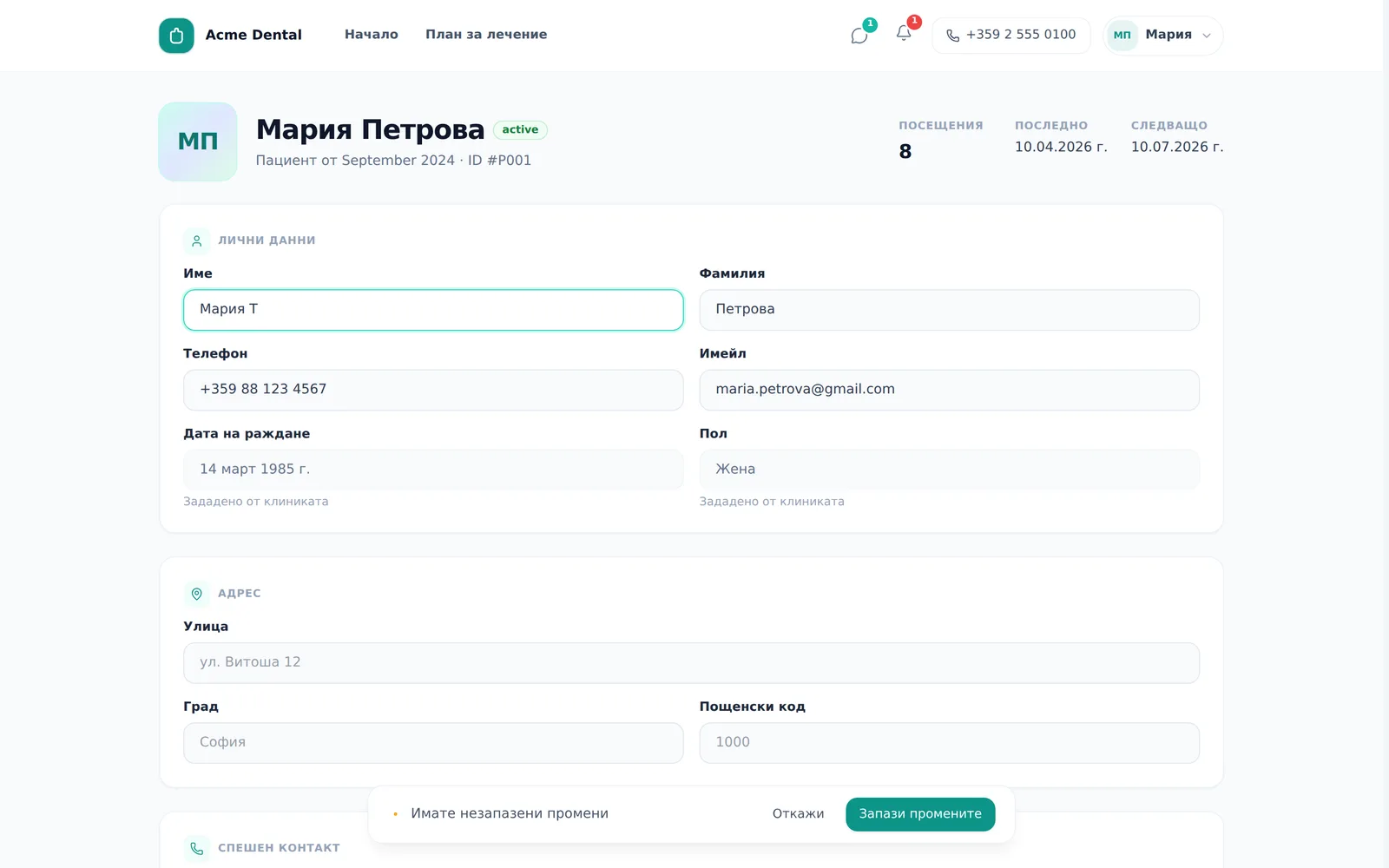
- Click Save changes (Запази промените) on the floating bar to keep your changes, or Discard (Откажи) to revert them.
The email in your profile is the address the clinic writes to. It does not change the email you sign in to the portal with.
Communication preferences
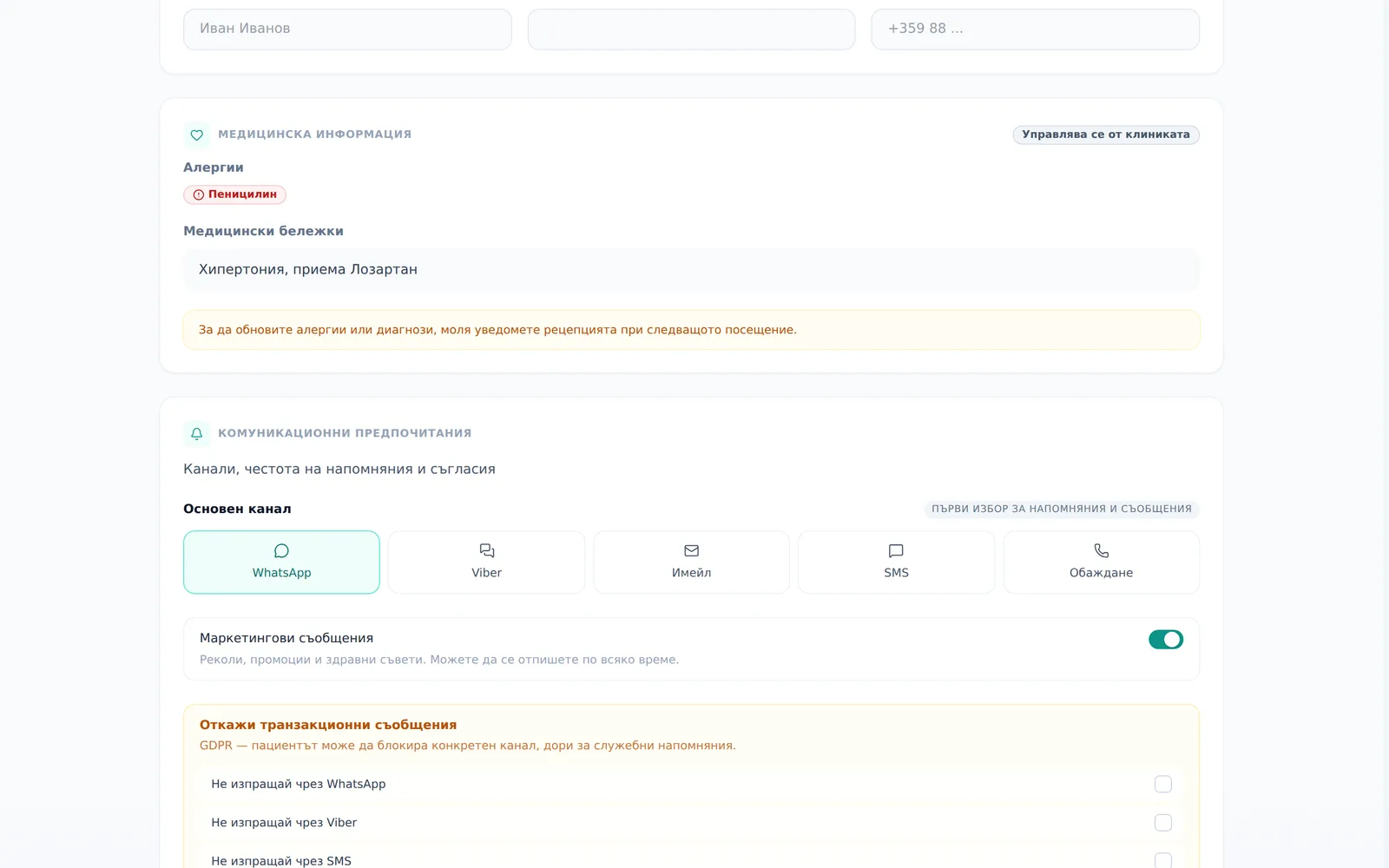
- Under Communication preferences (Комуникационни предпочитания), pick your Primary channel (Основен канал).
- Turn Marketing communications (Маркетингови съобщения) on or off — check-up reminders, promotions and health tips.
- Under Opt out of transactional messages (Откажи транзакционни съобщения), tick the channels the clinic shouldn’t use to reach you: Do not send via Viber (Не изпращай чрез Viber), Do not send via SMS (Не изпращай чрез SMS), Do not send via email (Не изпращай чрез имейл). An opt-out covers every message on that channel, service reminders included.
- Click Save changes (Запази промените).
Do not send via email (Не изпращай чрез имейл) stops every email from the clinic to you — appointment reminders, invoices, receipts, invites and more. The clinic sees the tick and can’t email you while it’s on — including a portal invite. The portal thread keeps working.
Saving your changes
The form shows a floating “You have unsaved changes” (“Имате незапазени промени”) bar, with Discard and Save changes buttons, whenever there’s something unsaved. Leaving the page without clicking “Save changes” silently discards your edits — with no warning. Always check for the bar before you navigate away.
Changing your password and signing out
- To change your password, click Change (Промени) next to “Password” (“Парола”), fill in the “Change password” (“Смяна на парола”) dialog (new password of at least 8 characters, plus confirmation) and click Save password (Запази паролата).
- To sign out of just this device, click Sign Out (Изход) in the Account Security card (separate from the sign-out in the profile menu at the top).
Frequently asked questions
Why can’t I edit my date of birth or gender? These fields are set by the clinic and shown as view-only with a “Set by clinic” (“Зададено от клиниката”) note — a mistake here is corrected only by the clinic staff, so your clinical and invoice records don’t drift out of sync.
Can I fix my own allergies or medical notes? No. Those are also view-only — tell the front desk at your next visit instead of editing them online. This protects clinical data integrity; it isn’t a missing feature.
How do I change the portal language? From the account menu at the top of the portal, under “Language”: Bulgarian, English, German, Russian or Italian. The choice is remembered. The language of the clinic’s emails doesn’t automatically follow it — by default they are in Bulgarian, and in other languages only if the clinic has turned that option on.
If I pick Viber or SMS as my preferred channel, will I actually get messages there? Not automatically yet — the clinic currently reaches you only by email and through the portal thread. SMS and Viber are coming soon, but the picker already works so you’re ready once they go live.
If I tick “Do not send via email”, will I still get appointment reminders? Not by email — the tick stops every email from the clinic, reminders, invoices and receipts included. Messages in the portal thread still show up. Untick it and save if you want emails again.
I forgot to click “Save changes” and left the page — what happened to my edits? They were silently lost. The floating bar shows exactly when there are unsaved changes — check it before you leave the page.


