Subscription & plans
This guide covers how DentaFlow’s price is built, how to buy and change the subscription, how to manage the card and invoices through Stripe, and how to read the status badge. This is separate from the invoices you issue to patients — this is the clinic’s own bill to DentaFlow. It applies to the Admin role. The app screenshots show the Bulgarian interface; every label below gives the Bulgarian original in parentheses.
At a glance
- New subscriptions have no size-based plans: the base subscription is 39 EUR a month with one doctor and includes NHIF and online booking, each additional doctor is +15 EUR, and you add modules as you choose.
- All prices in this guide include VAT. Paying yearly is 10% cheaper, and new clinics get a launch discount of −30% for the first 12 months.
- You buy on the pricing page with the Get started button, through Stripe Checkout, using an email that has no DentaFlow login yet.
- Modules, locations, storage and the billing period change in the Modules and items (Модули и позиции) card in Settings → Finance → Subscription.
- Changing the card, invoices and canceling all happen through Open billing portal (Отвори портал за плащания) — hosted by Stripe. Only Admin can open it; in a multi-location chain, only the billing (parent) location manages the subscription.
- The bank statement shows the charge from Mag Vision Ltd. (ЕИК BG203220345) — the legal entity behind DentaFlow, not a separate or unexpected fee.
- A failed payment restricts access gradually — see Failed payments & restricted access.
How the price is built
The total is the base subscription plus the items you need. Prices are in EUR, incl. VAT, at list on the pricing page.
| Item | Price | What it covers |
|---|---|---|
| Base subscription | 39 EUR / mo | All the clinical work, 1 doctor, unlimited front desk and assistants, 30 GB for images. It includes NHIF (DentaFlow generates the XML file you upload to the NHIF portal, one per contracted doctor, plus the RZI report and the contract checks) and online booking (a link, button and widget for your website and social media, with a confirmation by email) |
| Additional doctor | +15 EUR / mo per doctor | A doctor is a user with their own schedule and their own patients. Assistants, the front desk and the manager don’t count |
| Additional location | +29 EUR / mo per location | A separate profile with its own patients, schedule and invoices, on the same account. Doctors there are counted as everywhere else, and modules apply to all locations |
| Storage above the included | +5 EUR / mo per 50 GB | 30 GB is included plus 10 GB for each additional doctor, in a shared pool for the clinic. Above it you add 50 GB blocks |
Each module is a monthly fee for the whole clinic, not per doctor:
| Module | Price | What it covers |
|---|---|---|
| AI booking chat (AI чат за записване) | +19 EUR / mo | The assistant on /book answers the patient and books them into a free slot |
| Template website (Сайт по шаблон) | +19 EUR / mo | A clinic website with your services, team, prices and a booking button. DentaFlow switches the website on after payment |
| AI pack (AI пакет) | +29 EUR / mo | A team assistant and AI wording for treatment plans (the wording is in pilot) |
| Payments (Плащания) | +29 EUR / mo | Deposit links in EUR, USD or GBP, instalments and invoices in a foreign currency. Through your own Stripe account, with no commission from us |
Example: a clinic with 4 doctors and the AI pack pays 39 + 3 × 15 + 29 = 113 EUR a month at list. NHIF and online booking are in that total.
Submitting ambulatory sheets to NHIS is also in the base subscription, with no module and no fee. No module requires another module. A custom website and Marketing Boost (+79 EUR / mo) are agreed separately from the software.
Yearly billing
You pay monthly or yearly. Yearly billing costs 12 × 0.9 × the monthly price, so it is 10% lower, and is paid in one payment at the start: the base subscription comes to 421.20 EUR a year.
The subscription renews for the next month or year unless you cancel before then. If you cancel, you use DentaFlow until the end of the paid month or year; the amount for the rest isn’t refunded, except under the 30-day guarantee.
A clinic that bought a yearly subscription at the price × 12 between 13 and 17 November 2026 moves to the −10% price with its next change in the Modules and items (Модули и позиции) card.
Launch discount
While the launch campaign runs, every new clinic gets −30% off the whole subscription for the first 12 months. The discount is applied automatically at checkout and shows in the total on the pricing page: the base subscription comes to 27.30 EUR a month. After month 12 you pay the list price.
Yearly billing combines it with its own −10%: the base subscription is 294.84 EUR for the first year, then 421.20 EUR. If we sent you a link with an individual discount code, the code replaces the launch discount rather than adding to it.
SMS and Viber
DentaFlow doesn’t send SMS or Viber messages yet, so Settings has no message packs to buy. On the pricing page those lines are marked “coming”. Email reminders work and are unlimited.
Buying a subscription
- Open the pricing page and set the doctors, locations, modules and storage. The three starting configurations are starting points, not plans. The configurator goes up to 10 doctors and 3 locations; for a larger clinic, book a walkthrough.
- Choose Monthly or Yearly. The summary shows the total incl. VAT and the discount.
- Click Get started — this redirects to Stripe Checkout to pay by card.
- After payment, DentaFlow creates the clinic and sends you a sign-in email.
Use an email that has no DentaFlow login yet — neither as staff nor in the patient portal. A purchase with such an email creates no clinic and doesn’t change your profile: you get an email, we contact you to cancel the subscription and refund the amount, and you can then order again with another email.
Changing a modular subscription
- Go to Settings → Finance → Subscription (Настройки → Финанси → Абонамент), the Modules and items (Модули и позиции) card. The card is for modular subscriptions only and appears only on the billing (parent) location.
- Switch modules on or off, change the number of locations and storage blocks, or switch between Monthly (Месечно) and Yearly −10 % (Годишно −10 %). Locations can’t go below the number in the chain.
- Click Preview the change (Преглед на промяната) — you see the next invoice and the adjustment for the current period.
- Click Confirm (Потвърди). The change is prorated from today. Cancel (Отказ) puts the lines back as they were.
Prices on the card include VAT and are before discounts; the amount you pay is the one in the preview. When you stop a module, the data stays and only its function stops.
Doctors aren’t typed in. You pay for each active doctor who has signed in or has working hours, across the chain. The count updates on its own when the team changes and when the card opens; you change the doctors themselves under Team (Екип).
If the subscription is in any status other than Active, Trialing or Past due, the card is read-only and points you to the billing portal.
Clinics on an old plan
Clinics that bought before modules (Solo, Practice, Tourism, Founding Practice) keep their plan. Moving from an old plan to modules isn’t available in the app yet: Settings → Subscription shows only the current plan and the billing portal. The prices above are for new subscriptions.
Clinics with no active subscription
With no subscription, Settings → Subscription shows “No active plan (Без активен план)” and the How to renew (Как да подновя) link. A clinic with a canceled or unpaid subscription is redirected to the renewal page. Nothing is sold there, and what you see depends on the case:
- An invoice is unpaid (Има неплатена фактура) (an unpaid subscription, or a payment 30 or more days past due): an Admin clicks Open billing portal (Отвори портал за плащания), changes the card and pays the invoice. Once the payment goes through, the clinic’s plan continues unchanged. Other roles see that only an Admin can open the portal.
- No active subscription (Няма активен абонамент) (a canceled subscription, an expired signup or no subscription): click Write to support@dentaflow.bg (Пишете на support@dentaflow.bg) and we will renew the subscription for this same clinic, with its data. The page also shows the current prices.
Don’t order on dentaflow.bg to renew a clinic: a purchase with the same email is held and refunded, and a purchase with another email creates a new, empty clinic.
Checking your current subscription
- Go to Settings → Finance → Subscription (Настройки → Финанси → Абонамент), the Current plan (Текущ план) card.
- Review the name (“DentaFlow · модули” or the old plan’s name), the billing period, a status badge (Active / Trialing / Past due / Paused / Canceled, etc.), a trial countdown when trialing, and the next invoice date (or the date the subscription ends, if it’s canceling at period end).
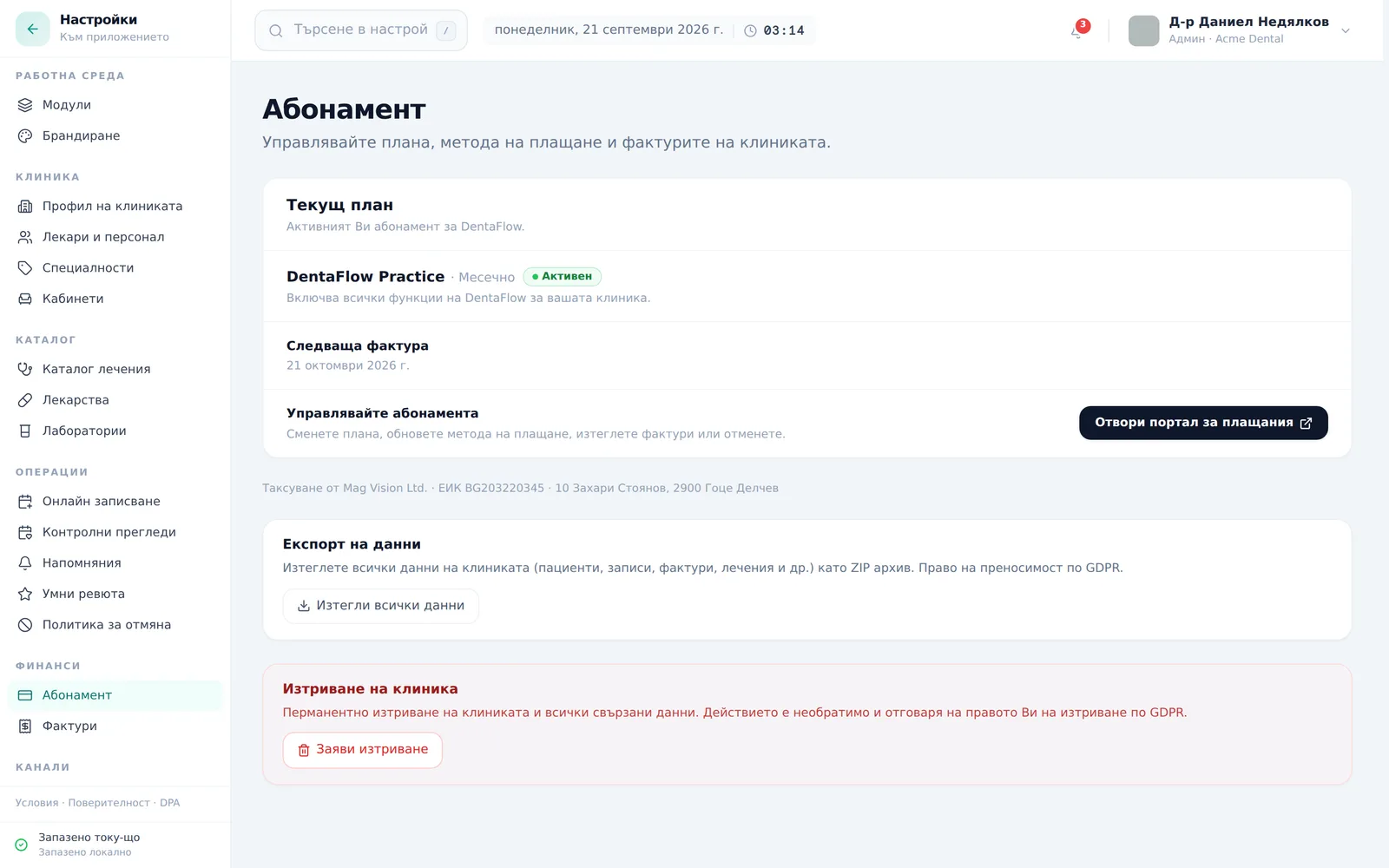
The screenshot shows a clinic on an old plan. On a modular subscription, the Modules and items card also appears below this card.
Managing payment through Stripe
- From Settings → Subscription, in the Manage subscription (Управлявайте абонамента) row, click Open billing portal (Отвори портал за плащания). Only Admin can open it — if another role clicks the button, it gets “Only clinic admins can open the billing portal. Ask an admin to manage billing.” („Само администратори на клиниката могат да отворят портала за плащане…“).
- Inside Stripe’s hosted portal, change the card, download invoices or cancel the subscription, then return to DentaFlow. Modules change in the Modules and items card, not in the portal. On an old plan, changing the plan also happens here when the portal offers it.
- If a payment fails, click Update billing (Обнови плащане) on the top-of-app banner — it jumps straight to the card-update screen in the portal. The “Payment failed (Плащането не успя)” card in Settings → Subscription only tells you what to do (“Update your payment method in the portal…”); the button there is Open billing portal (Отвори портал за плащания).
- In a multi-location chain, only the billing (parent) location has a manage button; other locations see “The subscription is managed by {parent}. (Абонаментът се управлява от {основна локация}.)” instead.
Frequently asked questions
Why does the clinic’s statement show “Mag Vision Ltd.” instead of “DentaFlow”? Mag Vision Ltd. (ЕИК BG203220345) is the legal entity behind the DentaFlow product — it’s the same subscription charge, just under the company’s registered name. It’s not an error and not an extra fee.
Is VAT added on top? No. The prices on the pricing page and in the Modules and items card already include VAT. You see the amount before you pay in Stripe Checkout.
Why is the price I’m charged different from the pricing page? Usually because of a discount or a change: the launch discount covers the first 12 months, a change to the modules adds an adjustment for the current period, and a new doctor changes the number of paid doctors. The actual charge is the amount in Stripe. If the two ever drift, the Stripe value is what applies.
We paused the subscription from the Stripe portal — does that lead to suspension? Not automatically. A pause the clinic starts from the Stripe portal stays indefinitely at the “warning” stage (banner only, nothing blocked) until you resume it from the portal. The “Subscription paused (Абонаментът е на пауза)” card in Settings → Subscription says the same: DentaFlow stays available.
Who manages the subscription if we have multiple locations? Only the billing (parent) location’s admin — other locations see “The subscription is managed by {parent}.” instead of a manage button.
Data export and deletion
On the same Settings → Subscription tab, below the plan card, there are two more cards: Data export (Експорт на данни) (button “Download all my data (Изтегли всички данни)”) and Delete clinic account (Изтриване на клиника) (button “Request deletion (Заяви изтриване)”). See Data export (GDPR) and Deleting your account.


