Deleting your account
This guide covers requesting full deletion of the clinic from DentaFlow — the GDPR Article 17 right to erasure — and canceling that request if you change your mind. This action is Admin-only and is never immediate: there’s always a 30-day grace period. The app screenshots show the Bulgarian interface; every label below gives the Bulgarian original in parentheses.
At a glance
- The deletion request lives in the red Delete clinic account (Изтриване на клиника) card on Settings → Finance → Subscription (Настройки → Финанси → Абонамент).
- Deletion isn’t immediate — there’s always a 30-day grace period before it becomes irreversible.
- Confirming requires typing the clinic’s name (capitalization doesn’t matter) — the same pattern as GitHub’s repo-delete confirmation.
- The app warns that deletion does not stop billing. When you request deletion, DentaFlow tries to set the subscription in Stripe to end at the end of the paid period, but this isn’t guaranteed — check in the billing portal.
- After the 30 days the data doesn’t vanish on its own: the final deletion is carried out by the DentaFlow team.
- Some records may be retained past deletion for the legal minimum required under Bulgarian healthcare and tax law.
Requesting deletion
- Go to Settings → Finance → Subscription (Настройки → Финанси → Абонамент) and scroll to the red Delete clinic account (Изтриване на клиника) card.
- Click Request deletion (Заяви изтриване).
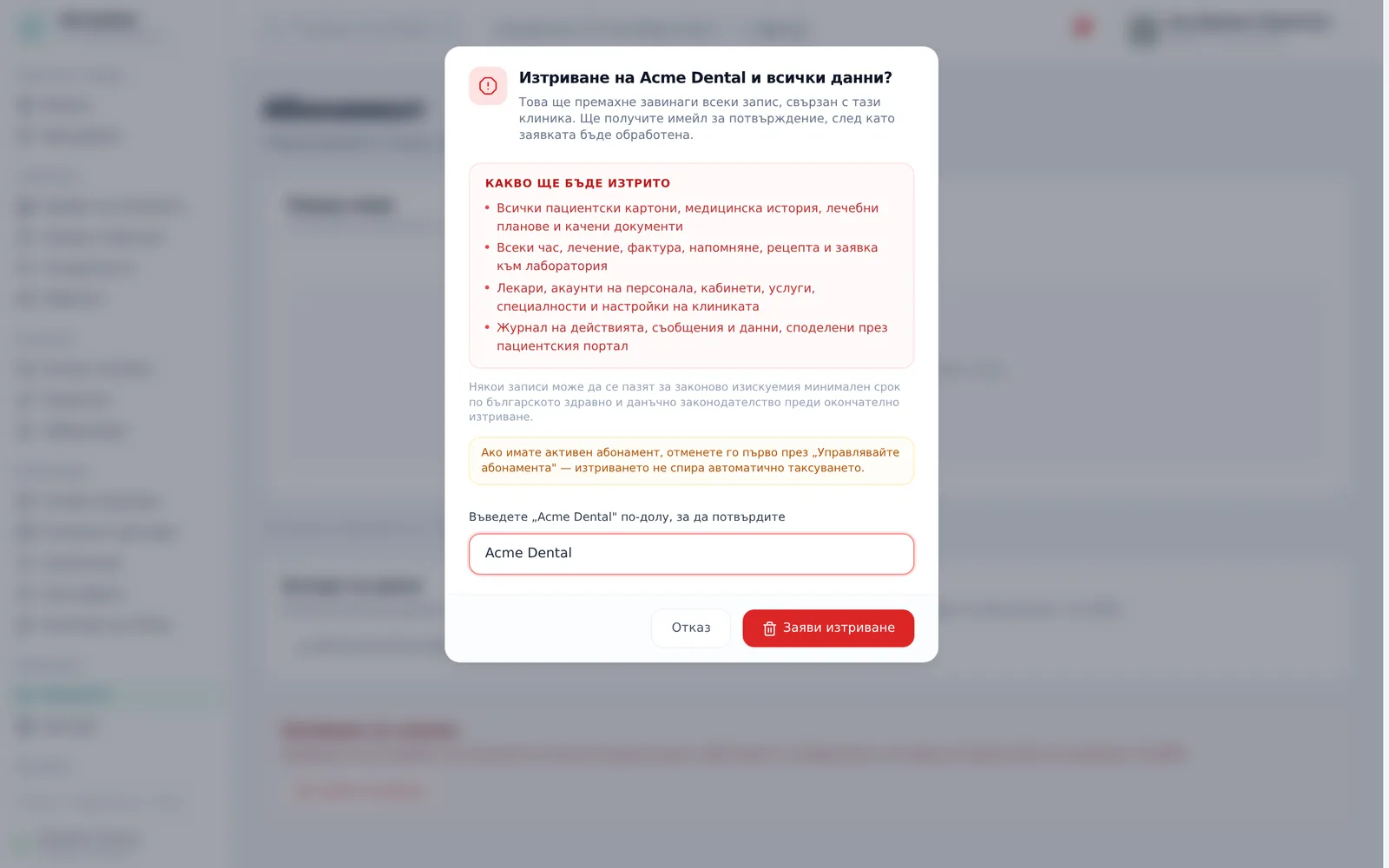
- The dialog “Delete {clinic name} and all data?” („Изтриване на {име} и всички данни?“) lists “What will be deleted” (Какво ще бъде изтрито): all patient records, medical history, treatment plans and uploaded documents; every appointment, treatment, invoice, recall, prescription and lab order; doctors, staff accounts, chairs, services, specialties and clinic settings; audit logs, messages and data shared via the patient portal. Below it are a note that some records may be kept for the legally required period, and a warning to cancel an active subscription first.
- Type the clinic’s name into the confirmation field (‘Type “{clinic}” below to confirm’) to unlock the button. Capitalization and leading or trailing spaces are ignored.
- Click Request deletion (Заяви изтриване) in the dialog — this schedules deletion 30 days out. A toast says “Deletion requested. You have 30 days to cancel before data is erased.”, and the date appears in the card’s banner.
Canceling the deletion
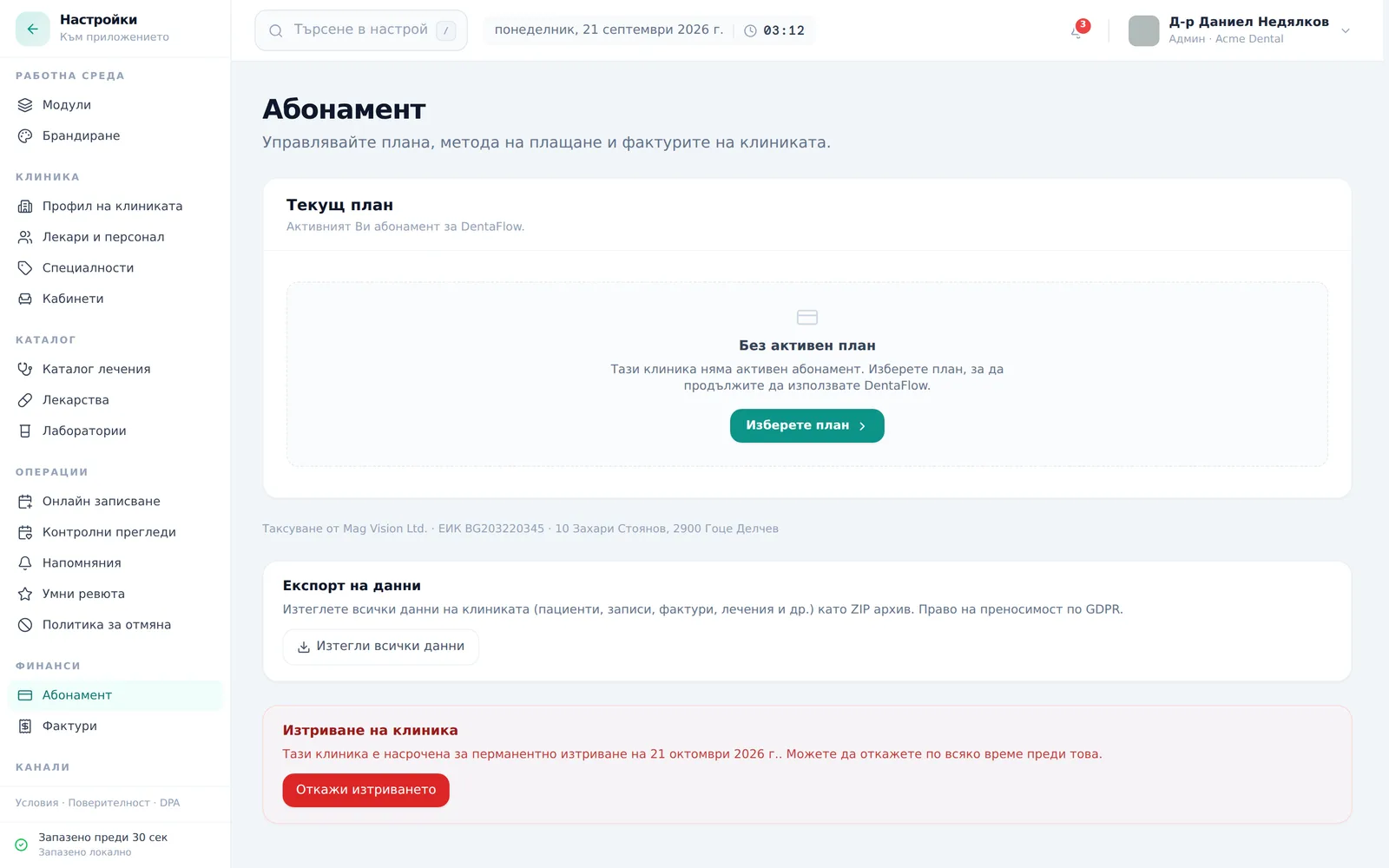
- While the 30-day window is open, the Delete clinic account card shows a banner: “This clinic is scheduled for permanent deletion on {date}. You can cancel any time before then.”
- Click Cancel deletion (Откажи изтриването) any time before the date to cancel — the clinic stays fully active, nothing lost; you see “Deletion cancelled — your account stays active.”
- Cancelling does not undo the change in Stripe: if the subscription was set to end at the end of the period when you requested deletion, open Open billing portal (Отвори портал за плащания) and check whether that is still the case.
Both the request and the cancellation are recorded in the audit log (as “Статус” — status change) — see The audit log.
Frequently asked questions
Will the DentaFlow subscription stop billing automatically if we request deletion? The app warns you to cancel the subscription first (“cancel it through Manage subscription first — deletion does not stop billing automatically”). The button in Settings → Subscription is Open billing portal (Отвори портал за плащания). When you request deletion, DentaFlow also tries to set the subscription to end at the end of the period, but if that fails Stripe keeps charging — so check in the portal. See Subscription & plans.
Can we change our mind after requesting deletion? Yes — any time within the 30 days, click Cancel deletion (Откажи изтриването) in the Delete clinic account card to fully cancel it.
What exactly gets deleted? All patient records, medical history, treatment plans and uploaded documents; every appointment, treatment, invoice, recall, prescription and lab order; doctors, staff accounts, chairs, services, specialties and clinic settings; audit logs, messages and data shared via the patient portal.
Is any data kept after deletion for legal reasons? Some records may be retained separately for the legal minimum required under Bulgarian healthcare and tax law, even after the clinic is deleted.
What happens when the 30 days are up? Deletion is not carried out automatically. After the grace period ends, the DentaFlow team gets a reminder and performs the final deletion from the admin panel. Until then the clinic stays in the system, and you can still cancel until it is carried out.
Who can request or cancel a deletion? Only the Admin role.
Do we get a copy of our data before deletion? Deletion doesn’t include an automatic export — download the archive separately before the deletion date. See Data export (GDPR).


