Rescheduling, cancelling & no-shows
Not every appointment goes as planned — a patient needs a different time, cancels the visit, or simply doesn’t show up. This guide covers editing, rescheduling and cancelling an appointment, and marking a no-show, from the Calendar, plus what happens to a paid deposit or a late-cancellation fee. It applies to Admin, Front Desk and Doctor. The screenshots below show the Bulgarian interface; every label gives the Bulgarian original in parentheses.
At a glance
- Every change to an appointment goes through the edit dialog — there is no drag and drop.
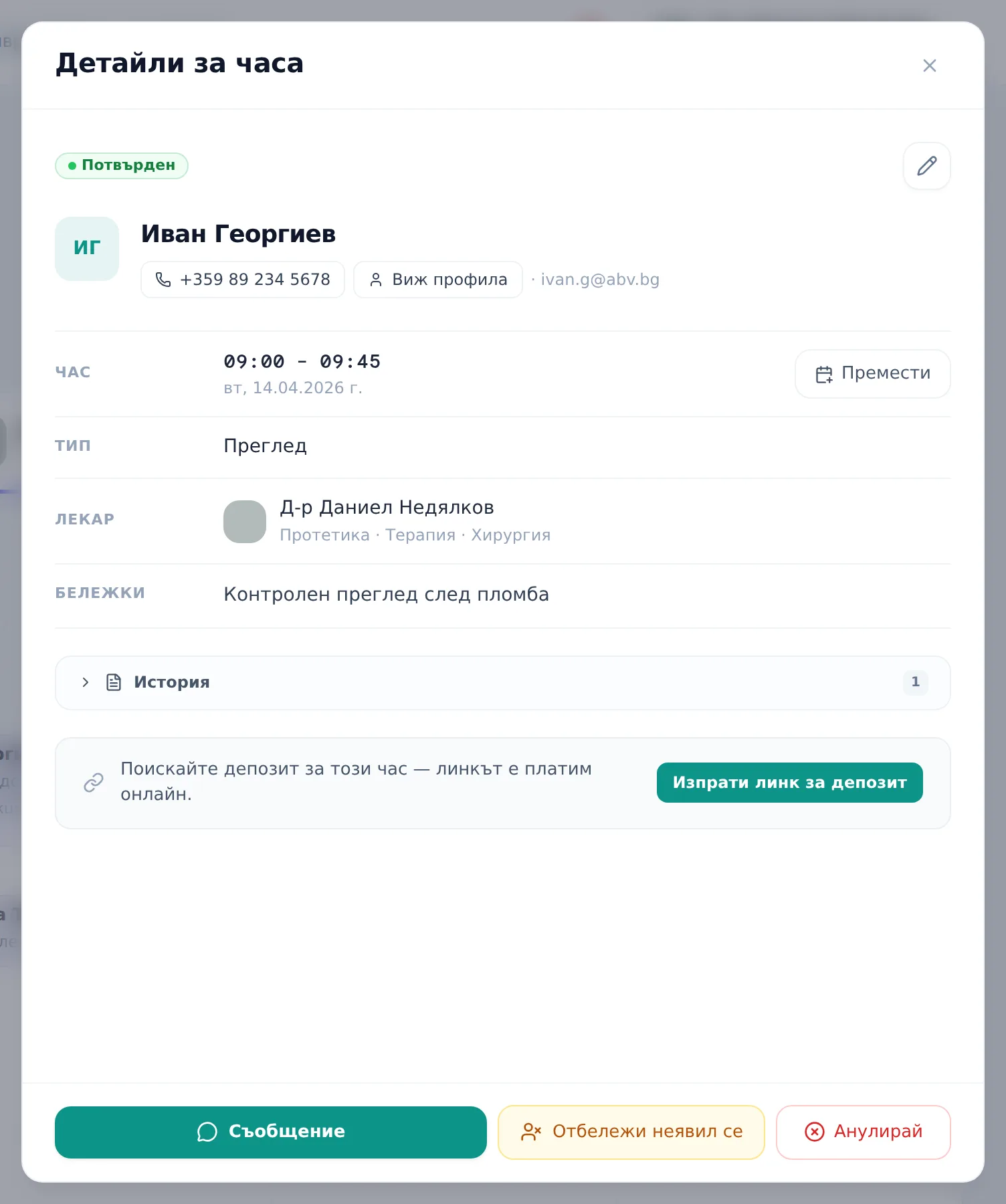
- Click an appointment to open the Appointment Details (Детайли за часа) panel; the pencil icon or the Reschedule (Премести) button open full editing.
- When the cancellation policy is on, cancelling inside the notice window automatically forfeits a paid deposit and/or adds a fee, unless you switch on Waive policy (Опрости политиката) (the toggle only appears when there is something to waive).
- Rescheduling (new date or start time), confirming a pending appointment, declining and cancelling email the patient automatically, if they have an email address. A no-show sends nothing.
- The Mark as no-show (Отбележи неявил се) button only appears when the cancellation policy is on.
- A slot freed by a cancellation with ≥24h notice opens a waitlist prompt, if the Waitlist module is on.
Editing and rescheduling an appointment
- Click an appointment card on the Calendar to open the Appointment Details (Детайли за часа) panel.
- Click the pencil icon — Quick edit (Бърза редакция) — or the Reschedule (Премести) button next to the Time (Час) row. Reschedule isn’t shown for cancelled, completed or no-show appointments.
- In the Edit appointment (Редактиране на час) dialog, change the Date (Дата), Time (Час) (start and end), Doctor (Лекар), Type (Тип) or Notes (Бележки) as needed. The time dropdowns follow the doctor’s and clinic’s working hours; Custom time… (Друг час…) allows a time outside them. If the end isn’t after the start you’ll see “End time must be after start time.”; if the patient has a lab order that isn’t ready yet, a warning about that appears.
- Click Save changes (Запази промените) (or Cancel (Отказ) to close without changes). The toast “Appointment updated” (Часът е обновен) confirms it.
Unlike booking a new appointment, this dialog doesn’t warn about a busy slot, the doctor’s day off or a closed clinic — check the calendar before you save.
If you changed the date or the start time, the patient gets an automatic email with the new date and time (if they have an email address and haven’t been marked “Don’t send by email” — Не изпращай чрез имейл). Changing only the doctor, type, notes or end time sends no email. There’s no drag-and-drop for moving appointments; every reschedule goes through this form.
If consent coverage is on and the patient has planned procedures without a signed consent, the panel shows the warning “Patient has planned procedures without signed consent”, linking to the plan.
Cancelling an appointment
- Open the appointment and click Cancel (Анулирай) (for a pending request the button is Decline (Откажи) — see Online booking requests; declining a pending request carries no fee and forfeits no deposit).
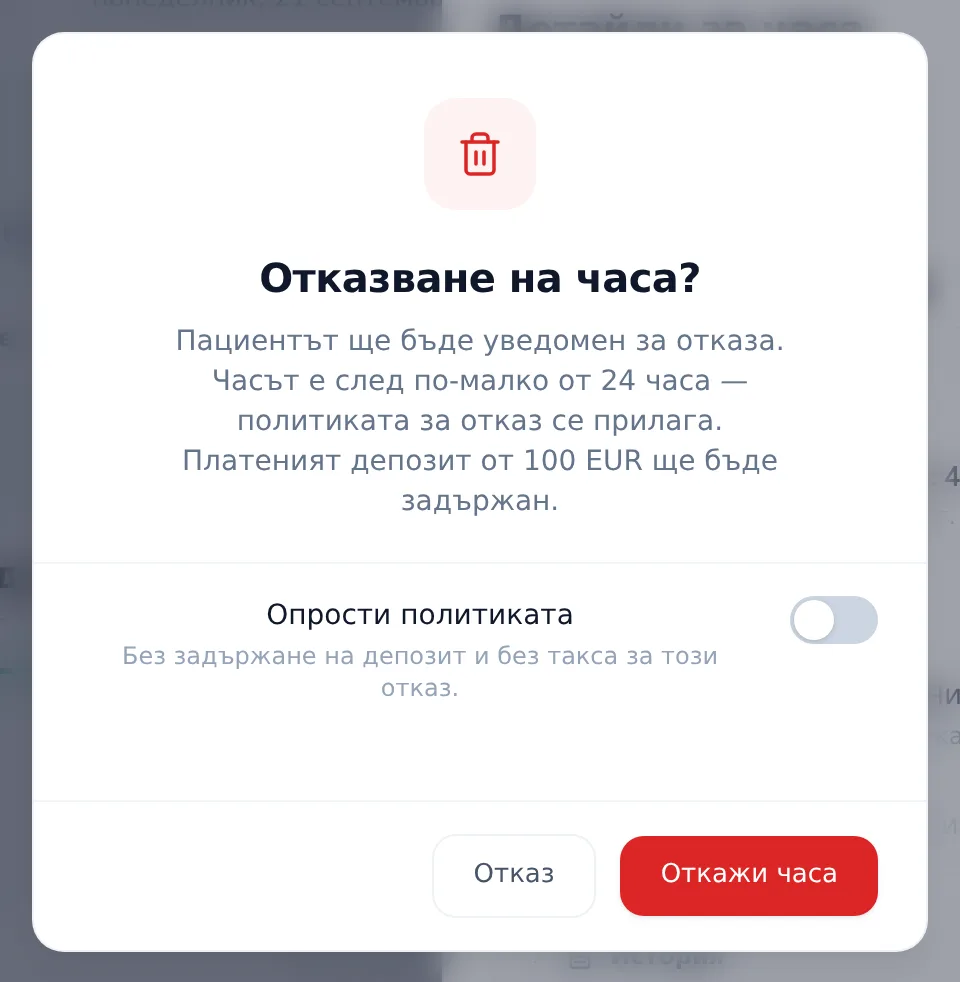
- The Cancel appointment? (Отказване на часа?) dialog says “The patient will be notified of the cancellation.” If the appointment starts in less than the notice period and the policy is on, it adds “The appointment starts in less than … hours — the cancellation policy applies.” and spells out exactly how much of a paid deposit will be forfeited and/or what late-cancellation fee will be added to the patient’s balance.
- If the cancellation shouldn’t carry a consequence for this patient, switch on Waive policy (Опрости политиката). The toggle only appears when there is a deposit to forfeit or a fee to charge.
- Confirm with Cancel appointment (Откажи часа). The toast “Appointment cancelled” (Часът е отказан) also says what was applied (“Deposit forfeited.”, “Fee … added to balance.”). The patient gets an automatic cancellation email if they have an email address. If the freed slot is ≥24h away and the Waitlist module is on, a prompt opens with the matching waitlist patients — it doesn’t message them (see Waitlist).
Cancelling a past appointment, or one well before the notice window, carries no consequence.
Marking a no-show
- Open a past appointment that isn’t yet completed, cancelled or marked no-show, and click Mark as no-show (Отбележи неявил се) at the bottom of the panel. The button only exists when the cancellation policy is on.
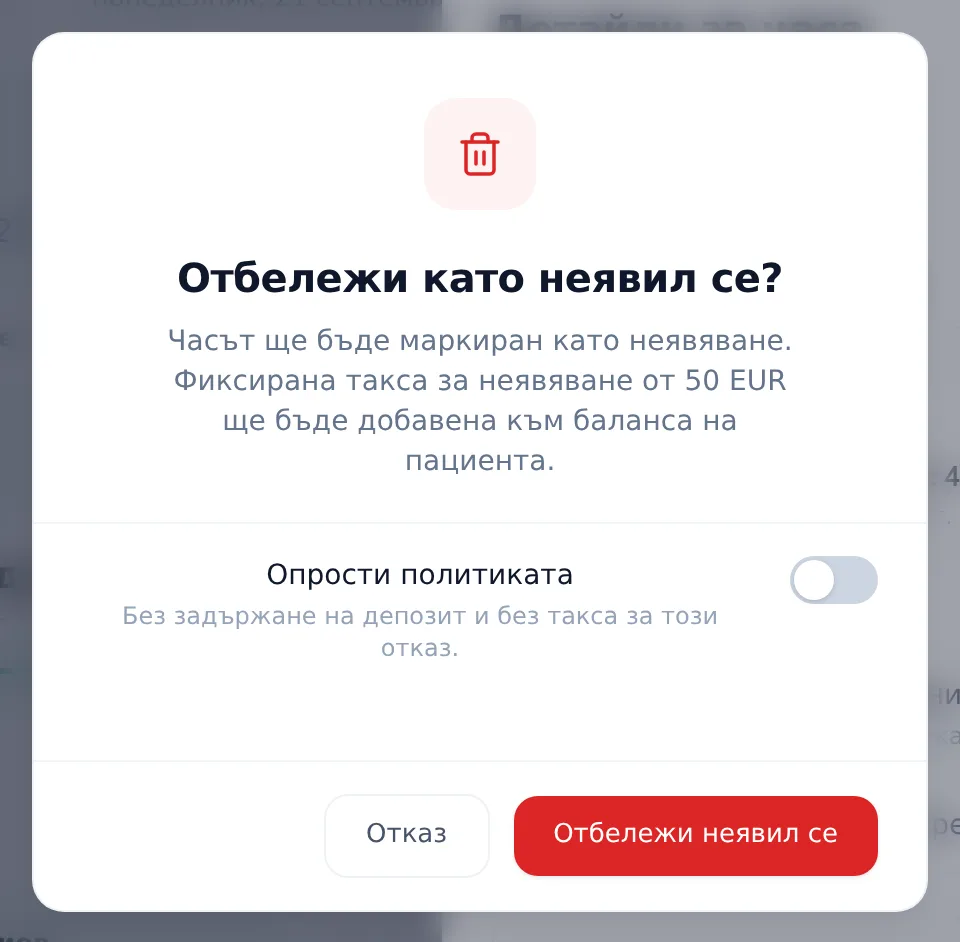
- The Mark as no-show? (Отбележи като неявил се?) dialog shows any flat no-show fee or paid-deposit forfeit that applies under the policy, with the same Waive policy (Опрости политиката) toggle (only shown when there is something to waive).
- Confirm with Mark as no-show. The toast “Marked as no-show” (Часът е маркиран като неявяване) says what was applied. The patient is not emailed.
Frequently asked questions
Can I move an appointment by dragging and dropping it? No. There is no drag-and-drop — every reschedule goes through the edit dialog described above.
Does cancelling or a no-show forfeit the deposit automatically? If the cancellation or no-show falls inside the clinic’s notice window, the deposit is forfeited and/or a fee is applied automatically, unless you tick Waive policy (Опрости политиката) — the policy is enforced for real, not just shown in the UI. Configure the policy itself in Cancellation policy.
Does the patient get notified for every change? Not for every change. An automatic email goes out when a pending appointment is confirmed, rescheduled (new date or start time), declined or cancelled — if the patient has an email address and isn’t marked “Don’t send by email” (Не изпращай чрез имейл). Changing only the doctor, type, notes or end time, and marking a no-show, send nothing. Emails are in Bulgarian unless the clinic has turned on patient email languages. Automatic SMS and Viber sending isn’t available yet — coming soon.
What happens to the freed slot after a cancellation? If you cancel from the Appointment Details panel, the cancellation frees a slot with at least 24 hours’ notice and the Waitlist module is on, a prompt automatically opens to check the Waitlist for a matching patient. A last-minute cancellation doesn’t trigger that prompt automatically. If another cancellation (for example from the portal) frees a future slot that matches an active entry, an in-app notification “A slot opened up” (Освободи се час) appears in the bell.
Why don’t I see a “Mark no-show” button on an upcoming appointment? The button is only available on past appointments that aren’t already completed, cancelled or marked no-show — not on upcoming ones. It also only shows when the cancellation policy is on (Settings → Operations → Cancellation policy).


